# Podcast API
An API for developers to get details on over 4 million podcasts, 200 million episodes, episode transcripts, webhook notifications for new and updated podcasts and more.
## What can you do with the API?
- Get details on any [podcast](#get-podcast-details) or [episode](#get-episode-details).
- Blazing fast [full-text search](#search-for-podcasts-or-episodes) to find podcasts and episodes.
- Get the [transcript](#get-episode-transcripts) for any episode.
- Get a [webhook event](#webhooks) for new or updated podcast data, or set up a [webhook filter](#setting-up-a-webhook-filter) to get notified whenever your brand gets mentioned on an podcast.
- A list of the [most popular podcasts](#get-the-most-popular-podcasts) on Taddy Podcast API, plus the [daily top charts](#top-charts-on-apple-podcasts) for podcasts and episodes.
- Return the [latest episodes](#get-the-most-recent-episodes) for a list of podcasts (helps you easily build a podcast feed).
- Get details on [multiple podcasts](#get-details-on-multiple-podcasts) or [multiple episodes](#get-details-on-multiple-episodes) (returns an array instead of one item).
- [Add a podcast](#add-a-podcast-to-taddys-directory) to our directory.
- **Use Taddy with your AI Tools:** A [Skill](#taddy-api-skill-mcp-server-and-docs) to give your AI coding tools useful context about our API and an [MCP Server](#taddy-api-skill-mcp-server-and-docs) to agentically use our API.
- **Enterprise features:** [Bulk download all 4+ million podcasts](#bulk-download-all-4-million-podcasts-and-200-million-episodes) from our directory.
### How to get the most out of Taddy API
[https://www.youtube.com/watch?v=kzjSjVjCMlk](https://www.youtube.com/watch?v=kzjSjVjCMlk)
### API Reference:
[PodcastSeries](#podcastseries) - Information on a podcast
[PodcastEpisode](#podcastepisode) - Information on an episode
[iTunesInfo](#itunesinfo) - Additional information from iTunes on a podcast
[Country](#country) - The country in which the podcast is made
[Language](#language) - The language spoken on the podcast
[Genre](#genre) - The genre of the podcast
[SortOrder](#sortorder) - The option to have returned items sorted by newest or oldest.
[PodcastContentType](#podcastcontenttype) - Helps you distinguish between audio and video podcasts
[PodcastSeriesType](#podcastseriestype) - Helps you distinguish between episodic and serial podcasts
[PodcastEpisodeType](#podcastepisodetype) - Helps you distinguish between episodic and serial podcasts
[TaddyType](#taddytype) - The types of media available on Taddy
[TopChartsSource](#topchartssource) - A list of platforms you can get Top Charts data from
[TopChartsType](#topchartstype) - A list of possible categories for podcasts or episodes to be ranked in
[SearchContentType](#searchcontenttype) - The types of media available to search for on Taddy
[SearchMatchType](#searchmatchtype) - Choose between searching for all terms, some terms or frequency
[SearchSortOrder](#searchsortorder) - The option to have search results be prioritized by exact term matching or popularity
[SearchRankingDetails](#searchrankingdetails) - Ranking details for each search result
[SearchResponseDetails](#searchresponsedetails) - Additional details for search request
[FeedRefreshDetails](#feedrefreshdetails) - Details on how often Taddy checks a podcast feed for updates
[WebhookFilter](#webhookfilterinput-webhookfilter-webhook-types) - Programmatically add, update or remove webhook filters.
[Person](#person) - People listed on the podcast including their roles (Host, Guest, etc).
[PopularityRank](#popularityrank) - Returns how popular the podcast is
[PodcastSeriesTranscriptionStatus](#podcastseriestranscriptionstatus) - Check if Taddy is automatically generating transcripts and chapters for this podcast
[PodcastEpisodeTranscriptionStatus](#podcastepisodetranscriptionstatus) - Check the status of automatically generated transcripts
[TranscriptItem](#transcriptitem) - Transcript details including text, timecodes and speaker info.
[TranscriptLink](#transcriptlink) - Link details where you can download the transcript for an episode.
[Chapter](#chapter) - Details on the chapters for an episode.
[ChapterLink](#chapterlink) - Link details where you can download chapters for an episode.
[AlternateEnclosureLink](#alternateenclosurelink) - Link details to alternative content formats for an episode (video or higher quality audio files)
More Links:
[Sign Up →](https://taddy.org/signup/developers)
[Webcomics API](https://taddy.org/developers/comics-api)
[Taddy Dashboard →](https://taddy.org/dashboard)
[Changelog](#changelog)
[Pricing](#pricing)
[Terms of Service](https://taddy.org/terms-of-service)
[Developer Policy](https://taddy.org/terms-of-service/developer-policy)
[Intro To Taddy API](#intro-to-taddy-api)
Blog Posts:
[The 5 Top Podcast APIs](https://taddy.org/blog/best-podcast-api-tools)
[iTunes API vs Taddy API - Which is better?](https://taddy.org/blog/itunes-vs-taddy-podcast-api)
[Listen Notes API vs Taddy API - Which is better?](https://taddy.org/blog/listen-notes-vs-taddy-podcast-api)
[PodcastIndex.org API vs Taddy - Which is better?](https://taddy.org/blog/podcastindex-vs-taddy-podcast-api)
[Should I rebuild my app on Bluesky’s AT Protocol?](https://taddy.org/blog/indie-developer-weighs-pro-cons-of-rebuilding-app-on-atprotocol)
---
# Intro To Taddy API
## Getting Started with our API
To get started using our API, follow these steps:
1. Signup for a [**developer account](https://taddy.org/signup/developers).**
2. Login to the [**dashboard**](https://taddy.org/dashboard) and get your API Key.
3. Follow the steps in the next section to make your first API request.
[https://www.youtube.com/watch?v=kzjSjVjCMlk](https://www.youtube.com/watch?v=kzjSjVjCMlk)
## Start with Taddy API Skill
We recommend adding our [open-source skill](https://github.com/taddyorg/taddy-api-skills) to your project.
It gives your AI coding tool (Claude Code, Codex, Cursor etc.) our full API docs in Markdown, our GraphQL schema, and best practices for things like pagination and error handling so you can easily add Taddy API to your app in minutes.
## Making your first request
If you’d rather make an API request yourself, go to [**api.taddy.org](https://api.taddy.org)** on your browser and copy & paste the below query:
```graphql
{
getPodcastSeries(name:"The Daily"){
uuid
name
itunesId
description
imageUrl
totalEpisodesCount
itunesInfo{
uuid
baseArtworkUrlOf(size:640)
}
episodes(limitPerPage:3){
uuid
name
datePublished
audioUrl
}
}
}
```
**Note:** All requests to Taddy API need to be authenticated to get a successful response. Don’t worry, it's easy to setup, but that means you will need to pass in your User ID and API Key in the headers. See Authentication section below for more details.
If you are using the [api.taddy.org](http://api.taddy.org) playground there is a ‘Headers’ section at the bottom of the screen, click to open it up and add your values for the headers `X-USER-ID` and `X-API-KEY` there. (you can see it being done @ 2:28 of the [Intro to Taddy API video](https://www.youtube.com/watch?v=kzjSjVjCMlk&t=149s)).

## Authentication
All requests to our API need to be authenticated. To get your API Key, log in to the [**Taddy Dashboard**](https://taddy.org/dashboard), you will see a “Get my API Key” button, clicking on it will reveal your API Key

You now have both your User ID and API Key and you will need to add both of them to the headers whenever you make an API request. Use the `X-USER-ID` and `X-API-KEY` keys and pass in your information as the values.
```graphql
{
"X-USER-ID": 7,
"X-API-KEY": "96c5007c18858e86d..."
}
```
## GraphQL vs REST APIs
Most developers will be familiar with REST APIs, but Taddy uses a GraphQL API. While both REST & GraphQL architectures are used to build APIs, we want to go over some of the unique benefits of GraphQL.
### Ability to write custom queries
The main difference is that with **REST** you go to multiple endpoints to get back different information on different topics. With **GraphQL** there is only 1 endpoint and you can write custom queries depending on what information you want to get back.

### Ability to get back custom responses
The big benefit of writing custom queries is that you get to specify the information you want back in the response. For the example below the first query gets back a podcast’s name and description, but the second one gets back the last 10 episodes. Practically, what this means is that depending on your business requirements, you can request the exact fields you need for your business use-case.

## Working with a GraphQL API
When working with a GraphQL API, you can either:
### 1. Use a GraphQL specific library (Recommended)
Dedicated GraphQL libraries make it easier than a standard HTTP library to do GraphQL specific things (ex: generating types from your queries). Here are some popular options for a few common languages:
- Javascript: [graphql-request](https://github.com/graffle-js/graffle/tree/graphql-request) (also check out our [**example project**](https://github.com/taddyorg/example-project)).
- Python: [glq](https://github.com/graphql-python/gql)
- Ruby: [GraphQL client](https://github.com/github-community-projects/graphql-client)
- iOS: [Apollo iOS](https://github.com/apollographql/apollo-ios)
- Android: [Apollo Kotlin](https://github.com/apollographql/apollo-kotlin)
**Note:** For a full list of libraries supported for even more languages, please see: [https://graphql.org/code/](https://graphql.org/code/)
### 2. Interact with our API using any http client
The below shows an example of a simple request to our API using curl. There are 3 important parts to the request:
- Sending a POST request to our GraphQL API Endpoint `https://api.taddy.org`
- Adding `Content-Type: application/json` , `X-USER-ID` & `X-API-KEY` in the headers.
- Sending the query you care about in the data field. You can read our [Podcast API](#podcast-api) docs to find all the different types of queries you can use.
```graphql
curl -X POST \
https://api.taddy.org \
-H "Content-Type: application/json" \
-H "X-USER-ID: 7" \
-H "X-API-KEY: 96c5007c18858e86d..." \
-d '{ "query": "{ getPodcastSeries(name:\"This American Life\") { uuid name } }" }'
```
**Note:** Currently, there are no official Taddy SDKs at the moment. However, one of the benefits of GraphQL is that types are built into it. If the language you using supports types, use a [GraphQL Specific Library](https://taddy.org/developers/intro-to-taddy-graphql-api).
## Useful Tips
### UUIDs
Every piece of content on Taddy has its own unique UUID and therefore you will be using UUIDs when interacting with our API. You can learn more about uuids on [**Wikipedia](https://en.wikipedia.org/wiki/Universally_unique_identifier).**
### Caching
We cache results from our API, which is great for API performance. Moreover, if your API request gets a cached response, it does not count against your monthly API limit 🥳.
### Pagination
Queries such as [**getPodcastSeries**](#get-podcast-details) can return multiple pages of results. For example the query below returns information on a podcast and its latest 10 episodes. By default, it returns the latest 10 episodes released but you can modify that by passing different parameters.
```graphql
// by default "episodes" returns the last 10 episodes
{
getPodcastSeries(name:"This American Life"){
uuid
episodes{
uuid
name
description
audioUrl
}
}
}
```
```graphql
// you can also pass in parameters for "episodes".
// This will return the exact same results as above
// as these are the default parameters
{
getPodcastSeries(name:"This American Life"){
uuid
episodes(sortOrder:LATEST, page:1, limitPerPage:10){
uuid
name
description
audioUrl
}
}
}
```
```graphql
// to get the 2nd page of results (the next 10 episodes)
{
getPodcastSeries(name:"This American Life"){
uuid
episodes(page:2){
uuid
name
description
audioUrl
}
}
}
```
### Check how many API requests you have left for the month
You can use this query to check how many API requests you have left for the month.
```graphql
{
getApiRequestsRemaining
}
```
### GraphQL Errors
A successful response will return the information you requested in the `data` key.
```graphql
{
"data": {
"answer": 42
}
}
```
However, when you get back an error, you get back an `errors` array, which returns a list of all the errors. Note the two values associated with each error: the `code` (a category code for the type of error) and the `message` (a helpful message to help you troubleshoot the error).
```graphql
{
"errors": [
{
"code": // An Error Code (We categorize errors using different codes)
"message": // Helpful message to help you problem solve the error
}
],
"data": {
"answer": null
}
}
```
Here is an example: (123 is not a valid uuid because a valid uuid has to be 36 characters long)

**Possible Error Codes**
| Code | HTTP status | What it means |
| --- | --- | --- |
| `API_KEY_INVALID` | `401` | Your `X-API-KEY` or `X-USER-ID` headers are missing or invalid. |
| `API_RATE_LIMIT_EXCEEDED` | `429` | You've hit your per-minute or monthly request limit. |
| `INVALID_QUERY_OR_SYNTAX` | `400` | There is a spelling or syntax mistake in your query, or a required argument is missing. Use the message value as a hint as to what can be fixed. |
| `QUERY_TOO_COMPLEX` | `400` | Your query is too complex. Every field you request adds to the query's cost, and fields inside a list are multiplied by the number of items requested. The error's `extensions.queryCost` and `extensions.maxQueryCostAllowed` tell you how much you need to cut. Remove fields, or request fewer items, and try again. |
| `BAD_USER_INPUT` | `200` | One of the arguments you passed in is invalid. Use the message value to get more details on what is invalid. |
| `REQUIRES_USER_AUTHENTICATION` | `200` | You need to be logged in to make that request. |
| `ACCESS_NOT_ALLOWED` | `200` | You are not allowed to access this feature, query or mutation. (e.g. access to webhooks or episode transcripts not provided by the podcast) |
| `TADDY_SERVER_ERROR` | `200` | Something is wrong on our end. We monitor for this, but feel free to reach out to danny@taddy.org if you keep getting this error. |
`400`, `401` and `429` status codes mean your request was rejected before it ran, so there will be no `data` field returned.
A `200` with errors means your request ran, but some (or all) fields failed. Always check the `errors` array. Any fields that succeeded are still returned in `data`.
### Example Project
Here is an [**example project**](https://github.com/taddyorg/taddy-api-example-project) in Node.js that uses Taddy’s API.
More Links:
[Sign Up →](https://taddy.org/signup/developers)
[Taddy Dashboard →](https://taddy.org/dashboard)
[Terms of Service](https://taddy.org/terms-of-service)
[Developer Policy](https://taddy.org/terms-of-service/developer-policy)
---
# Pricing
We have 3 tiers for our API: Free, Pro & Business.
With the Free version of Taddy API, you get 500 API requests per month.
With the Pro or Business versions of Taddy API, you get more API requests per month plus additional features.
## Pro ($75/month)
---
- [x] Up to 100,000 API requests per month
- [x] 100 episode transcripts per month.
- [x] Priority Support
## Business ($150/month)
---
- [x] Up to 350,000 API requests per month
- [x] 2000 episode transcripts per month.
- [x] Access to additional transcripts
- [x] [Webhook](https://taddy.org/developers/webhooks) notifications for new or updated content
- [x] Priority Support
### Pricing that scales with your application
$75/month (Pro) - 100k API requests per month. 100 Episode transcripts per month.
$150/month (Business) - 350k API requests per month. 2000 Episode transcripts per month.
$250/month (Business) - 1 Million API requests per month. 2000 Episode transcripts per month.
### **Can I buy additional episode transcripts?**
Yes! Business plan users can buy additional transcript packs of 3,000 transcripts for $75 each (or $0.025 per transcript). Turn on **Auto-scaling Episode Transcripts** from your dashboard so that when your account has used up 95% of your transcript credits, we automatically add a new pack of 3,000 transcripts to your account and charge your account $75. You can also set the maximum number of packs your account can auto-purchase per month.
Contact `danny@taddy.org` if you need to make over 1 Million API requests per month or want to buy extra transcript packs. We have fair pricing that gets cheaper as you scale up.
More Links:
[Taddy Dashboard →](https://taddy.org/dashboard)
[Terms of Service](https://taddy.org/terms-of-service)
[Developer Policy](https://taddy.org/terms-of-service/developer-policy)
---
# Add a Podcast to Taddy’s Directory
Taddy’s Directory has over 4 million podcasts and we add more podcasts to our directory every day. Once you add your podcast to Taddy’s Directory, we notify all the podcast players that use Taddy’s API that there is a new podcast that has been released.
## How to add a Podcast to Taddy
1. Use the REST endpoint: **** **https://taddy.org/feeds/add-podcastseries** (POST)
2. Add your `X-USER-ID` and `X-API-KEY` values to the headers (see [Intro Guide](https://taddy.org/developers/intro-to-taddy-graphql-api) for instructions on how to get your API Key and User ID)
```graphql
{
"X-USER-ID": 7,
"X-API-KEY": "96c5007c18858e86d..."
}
```
3. Add `rssUrl` (required) and `itunesId` (optional) values to the data being passed with the POST request.
```graphql
{
"rssUrl": "http://feed.thisamericanlife.org/talpodcast",
"itunesId": 201671138
}
```
You will get back one of the following responses:
**Success:** On a successful response you get back a `status` and the `uuid` for the added podcast (uuid is the distinct identifier for all content on Taddy).
```graphql
{
"status": "success",
"uuid": "d682a935-ad2d-46ee-a0ac-139198b83bcc"
}
```
**Error:** When we encounter an error adding a new podcast to Taddy. We send back a string with the error message.
```graphql
`Could not add podcastseries to Taddy`
```
### Example:
```graphql
curl -X POST \
https://taddy.org/feeds/add-podcastseries \
-H "Content-Type: application/json" \
-H "X-USER-ID: 7" \
-H "X-API-KEY: 96c5007c18858e86d..." \
-d '{ "rssUrl": "http://feed.thisamericanlife.org/talpodcast", "itunesId": 201671138 }'
```
**Notes:**
- Once you send a request: 1) We immediately add the podcast to Taddy’s Directory and 2) Queue up a job to parse the podcast feed’s XML, including all episodes. This second step may take up to 30 mins but is usually much sooner.
- Adding the itunesId is optional, especially if you don't know it yet. We check the iTunes API every day for new podcasts and will match the rssUrl to one given from iTunes API to update the itunesId for a podcast without one.
- Trying to re-add a podcast that has already been added to our directory will return a successful response and return the uuid for the podcast series.
- If you are run into any issues, please contact `danny@taddy.org`.
More Links:
[Sign Up →](https://taddy.org/signup/developers)
[Taddy Dashboard →](https://taddy.org/dashboard)
[Pricing](#pricing)
[Terms of Service](https://taddy.org/terms-of-service)
[Developer Policy](https://taddy.org/terms-of-service/developer-policy)
---
# AlternateEnclosureLink
Get links to alternative content formats for an episode. ex) a video file or higher (or lower) quality audio files available for this episode. Taken from the tag `` in the RSS feed.
```graphql
type AlternateEnclosureLink {
" MIME type of the media "
type: String
" File size in bytes. Typed as Float (not Int) to support 64-bit integers (very large files)"
length: Float
" URI to the media file "
uri: String
" (Optional) Bitrate of media "
bitrate: String
" (Optional) Height in pixels (for video) "
height: Int
" (Optional) BCP 47 language tag "
lang: String
" (Optional) Human-readable title "
title: String
" (Optional) Relationship/grouping identifier "
rel: String
" (Optional) RFC 6381 codec string "
codecs: String
" (Optional) If true, this is the same content as the standard enclosure "
default: Boolean
" (Optional) Content type of this specific source, if different from the media type "
sourceContentType: String
}
```
**Example:** Check out the recent episodes from the Podnews Daily podcast (uuid: “027bc08a-e1b5-471a-b9eb-175dab5aba63”). Each episode returns multiple audio files (mp3, acc, opus) and a video file (mp4)
---
# Bulk download all 4 million podcasts and 200 million episodes
The vast majority of Taddy API users signup for an API key and use the Free, Pro or Business plan. It is the quick and straightforward way to get podcast data into your application.
However, there are some use cases where you might want to store all podcast and episode data in your own database. If this is your use case, Taddy makes it easy to:
- **Export all podcast data from Taddy API** - A one-time export of all podcast and episode data from Taddy’s database.
- **Keep your database in sync with our database** – Get a [webhook notification](#webhooks) for any new or updated podcast or episode. Taddy API is continuously checking RSS feed, when we see new or updated data we update our API and push any those updates to you via a webhook endpoint on your server.
When used together, the database export and webhooks allow you to keep your own up-to-date database of all podcasts and episodes.
### **Costs** to you:
**Taddy API Costs:** One-time fee for data export ($3250, see more details below), plus a Taddy API Business plan ($150/month) is required to receive webhook events for new or updated episodes.
**Infrastructure Costs:** Yes. (~$200 to $400 per month to host your own infrastructure).
**Additional Setup + Maintenance Costs:** Yes. (You need to maintain and host your own database/infrastructure).
### **Why Choose This Option?**
This option is ideal if you want complete control over your podcast data. If you are unsure, start using podcast data via our API for simplicity, and transition to full data control if / when needed.
## **Export data from Taddy API**:
Taddy offers a **complete export** of our podcast data, including an export of these tables:
- podcast table (4 million podcasts)
- episodes table (200 million episodes)
- genres table (a podcast can belong to up to 5 genres)
- itunes_info table (additional information on the podcast from Apple iTunes)
📦 **Full Dataset Size:** ~80 GB
💰 **One-time Fee:** **`$3,250 USD`**
📎 [Download a Sample dataset](https://github.com/taddyorg/podcast-dataset-export) of 10,000 podcasts and episodes.
If you have any further inquiries or want to purchase the full dataset, please contact **`danny@taddy.org`**
## Monthly Snapshots
If you have purchased the above one-time export and you are on the Taddy Business plan, you get access to monthly snapshots of podcast data from our database on the **1st of every month**.
**To download info on what snapshot files are available:**
Download the JSON file at https://ax3.taddy.org/db-snapshot/contents.json. You must pass in your Taddy API `X-USER-ID` and `X-API-KEY` in the headers.
**Example:**
```graphql
curl -H "X-USER-ID: 1" -H "X-API-KEY: xyz..." \
https://ax3.taddy.org/db-snapshot/contents.json > ~/Downloads/contents.json
```
The JSON file lists available tables, when they were last updated, and the corresponding file names.
**Example:**
```graphql
[
{
"tableName": "podcastseries",
"updatedAt": "2025-05-01T04:00:40.000Z",
"fileNames": [
"podcastseries.zip"
]
},
{
"tableName": "podcastepisode",
"updatedAt": "2025-05-01T06:18:16.000Z",
"fileNames": [
"podcastepisode-part1.zip",
"podcastepisode-part2.zip",
"podcastepisode-part3.zip"
]
},
{
"tableName": "genres",
"updatedAt": "2025-05-01T03:56:52.000Z",
"fileNames": [
"genres.zip"
]
},
{
"tableName": "itunes_info",
"updatedAt": "2025-05-01T03:58:17.000Z",
"fileNames": [
"itunes_info.zip"
]
}
]
```
**Downloading each file:**
To download each file listed in contents.json, use this format: https://ax3.taddy.org/db-snapshot/{fileName} and pass in your Taddy API `X-USER-ID` and `X-API-KEY` in the headers.
**Example:**
```graphql
curl -H "X-USER-ID: 1" -H "X-API-KEY: xyz..." \
https://ax3.taddy.org/db-snapshot/podcastseries.zip > ~/Downloads/podcastseries.zip
```
**Note: If** you downgrade from Taddy Business Plan to a lower plan, you will lose access to future monthly snapshots.
If you have any questions, please contact **`danny@taddy.org`**
More Links:
[Sign Up →](https://taddy.org/signup/developers)
[Taddy Dashboard →](https://taddy.org/dashboard)
[Pricing](#pricing)
[Terms of Service](https://taddy.org/terms-of-service)
[Developer Policy](https://taddy.org/terms-of-service/developer-policy)
---
# Changelog
Recent updates to Taddy API.
## Skill & MCP Server for Taddy API
November 5, 2026
- An [open-source skill](https://github.com/taddyorg/taddy-api-skills) that has our docs, GraphQL Schema, and best practices for things like pagination and error handling.
- An MCP server available at [https://taddy.org/mcp/podcast-api](https://taddy.org/mcp/podcast-api)
## New `useOnlyPodcastProvidedTranscript` argument for transcripts
October 2, 2026
- `getEpisodeTranscript`, `transcript` and `transcriptWithSpeakersAndTimecodes` accept a new optional argument `useOnlyPodcastProvidedTranscript` (default: false). When true, only a transcript published by the podcast itself is returned, and null is returned if the podcast does not provide one. It never uses Taddy’s on-demand transcription feature, and never uses a transcription credit. It takes precedence over `useOnDemandCreditsIfNeeded`. This is useful for Free users requesting transcripts, and for Paid users who want to guarantee a request uses no transcript credits.
- When a transcript requires a Pro or Business plan, Free users now receive the error code `ACCESS_NOT_ALLOWED` instead of `TADDY_SERVER_ERROR`. The error message is unchanged: i.e.) “You need to be a Pro or Business Taddy API user to access the transcript for this episode.”
## Auto-scaling Episode Transcripts.
August 27, 2026
- Business plans include 2,000 episode transcripts per month. If you believe you may need more than that, you can turn on auto-scaling for episode transcript on your dashboard. when you hit 95% of your current limit we'll automatically add a new transcript pack: 3,000 transcripts for $75 (2.5¢ each transcript). You can also set a max number of transcript packs your account can buy in a month.
- When your billing resets each month, your transcript limit resets back to the Business Plan default (2,000 episode transcripts/month) and you lose any unused transcripts credits from the previous month.
## BREAKING UPDATE - iTunes ID now returns Float instead of Int
August 5, 2026
- New podcasts on Apple Podcasts can now have iTunes IDs larger than the 32-bit integer limit. Our GraphQL schema previously returned these as type `Int` (which is limited to 32-bit values), causing some queries to error with "Int cannot represent non 32-bit signed integer value." We've updated the schema to return type `Float`, which can safely represent integer values well beyond the 32-bit limit.
- A podcast episode's `fileLength` had the same issue. Updating it to `Float` allows it to return much larger file sizes.
In total, these 4 properties were updated:
```graphql
PodcastSeries.itunesId: Int -> Float
iTunesInfo.publisherId: Int -> Float
PodcastEpisode.fileLength: Int -> Float
AlternateEnclosureLink.length: Int -> Float
```
And these 2 queries were updated:
```graphql
getPodcastSeries(itunesId: Int) -> getPodcastSeries(itunesId: Float)
getItunesInfo(itunesId: Int) -> getItunesInfo(itunesId: Float)
```
This is a breaking change that might affect you in 3 ways:
- **Typed GraphQL variables:** If you pass typed variables to these queries, e.g. `query($id: Int!) { getPodcastSeries(itunesId: $id) }`, update the type to `Float`: `query($id: Float!) { getPodcastSeries(itunesId: $id) }`
- **Codegen clients:** Strongly-typed codegen clients (Swift / Kotlin / Java / C# / Go) will see the generated model fields change from `Int` to `Double` on their next code generation.
- **Database storage:** If you save any of these 4 properties in your database as a 32-bit `int` column, migrate it to `bigint`to avoid overflow errors.
We try very hard not to introduce breaking changes to the Taddy API, but we believe this was the best solution for this bug. Over the next few days, we'll reach out via email to any user we see with failing queries related to this issue.
## Taddy API Status Page and Usage Alerts
June 17, 2026
- We launched a [status page](https://status.taddy.org/) for Taddy API.
- You can now [subscribe to get an email or webhook alert](https://taddy.org/dashboard/my-apps/notifications) when your API usage or transcribe credits cross certain thresholds.
- We have scheduled maintenance for Saturday June 27th from 5AM to 8AM PDT. During this time we expect a small amount of downtime (under 2 minutes) and a couple hours where background services like crawling RSS feeds and indexing new episodes are going to be delayed.
## HLS Video and other alternate enclosures
March 17, 2026
- You now access a list of all the [AlternateEnclosureLinks](#alternateenclosurelink) available for an episode. This means if a podcast creator wants to provide a video along with audio or different quality audio or video files, you now have access to all these alternate enclosure links.
- This also means an episode can now have a `audioUrl` and `videoUrl` available. We default to using the highest quality file to fill in the missing audioUrl or videoUrl if one is available.
- This tag is still not widely supported yet, but check out the latest episodes from the Podnews Daily podcast (uuid: “027bc08a-e1b5-471a-b9eb-175dab5aba63”) to see an example.
## Webhook Filters & Replaying failed webhook events!
January 16, 2026
- Add a [regex expression](#setting-up-a-webhook-filter) so that you only get webhook events for podcast data you care about. You can use it for:
- **Brand monitoring** - Get notified when your company or product is mentioned on a new episode. Set up a filter with regex like `\byour-brand\b`.
- **Sales intelligence** - Track when prospects or competitors appear on podcasts. Combine this with our transcript API to extract context that can be used in lead scoring.
- **Industry research** — Monitor keywords or key executives in your industry. For example, a filter with regex like `\b(FDA approval|clinical trial|drug recall|Phase [1-3]|NDA filing)\b` keeps you on top of latest pharma trends.
- Use [`replayFailedWebhookEvents`](#replaying-failed-webhook-events) to replay all webhook events that did not successfully get sent to your webhook endpoint over the last 14 days.
## Fix to Transcripts count
January 14, 2026
Pro users’ transcription count was not being reset to 0 on their billing cycle! Thanks for reporting the error. All transcripts counts were reset to 0 for Pro users and the error has been fixed. Sorry about the inconvenience!
## Fix to TopChartsQuery
November 20, 2025
The getTopChartsByCountry and getTopChartsByGenre queries (which returned the daily top charts from Apple) were not being updated for the past 7 days. We have fixed the issue and the charts are back in sync. Sorry about the inconvenience!
## Improvements to Transcripts!
September 12, 2025
- Episode transcripts are available to all paid users (Pro and Business)
- 100 Episode Transcripts/month are included on the Pro Plan
- 2000 Episode Transcripts/month are included on the Business Plan
- We've simplified our credit system for transcripts. Previously, we had 2 types of credits for transcripts (one for transcripts that Taddy API had already generated and one for transcripts we hadn't). Now, we combined both into one.
## Marketing Updates
August 20, 2025
Check out our new Taddy API [home page](https://taddy.org/developers), [pricing](https://taddy.org/developers/pricing) page, and [Why we Built Taddy](https://taddy.org/developers/why-we-built-taddy) page.
## Improvement to getEpisode
May 21, 2025
We added `seriesUuidForLookup` to the [getEpisode](#get-episode-details) query.
This is useful because an episode’s guid is not guaranteed to be unique (two different podcasts can use the same guid for episodes in their podcast). With`seriesUuidForLookup`, if you know the podcast’s uuid and an episode’s guid, you can get exactly the episode you want.
## Monthly Snapshots Added
May 1, 2025
If you pay for the one-time data export and have a Taddy Business Plan, you get access to a snapshot of all podcast data from our database on the 1st of every month. See [here](#bulk-download-all-4-million-podcasts-and-200-million-episodes) for doc on how to access these monthly snapshots.
## 2 New Queries Added
April 22, 2025
- Added [getPopularContent](#get-the-most-popular-podcasts). It lists the most popular podcasts and allows you to filter by language and genres.
- Added [getLatestPodcastEpisodes](#get-the-most-recent-episodes). It allows you to get the most recent episodes for multiple podcasts (ie: Makes it easy for you to build a Podcast Feed)
- Added the property `popularityRank` on PodcastSeries. ex) if a podcast is in the TOP_200, TOP_1000 podcast etc.
## New Search API
March 4, 2025
We’ve made search faster & improved the quality of search results returned. See [search](#search-for-podcasts-or-episodes) for documentation.
**Note:** The old search query (`searchForTerm`) now uses the new search engine behind the scenes, so you don't have to update your queries to see improved results. However, the new search query (`search`) does have some new features and improved syntax. So, try it out!
## Links from description
January 8, 2025
Added the GraphQL property `descriptionLinks` to [PodcastSeries](#podcastseries) and [PodcastEpisode](#podcastepisode). This gives you an easy way to get all the URLs inside a podcast’s or episode’s description.
## Even more transcripts
December 7, 2024
We made some updates to our transcription feature:
- We’ve updated the transcription model to use the latest Open AI Whisper model `large-v3-turbo`
- We stopped using pyannote-audio for speaker diarization and speaker identification. We found it hard to offer high-quality speaker diarization and identification for cheap. It resulted in users not using this feature. We try very hard not to deprecate any feature we build but we decided to stop using pyannote-audio and double-down on what people are currently using: high-quality transcripts.
- We’ve increased the number of transcripts on Taddy going from all episodes of the top 650 podcasts to all episodes from the top 2,000 podcasts in our directory. We plan to increase this even more in the next couple of months after we finish transcribing the back catalogue of these episodes.
## Updates to Queues
October 22, 2024
To ensure we are checking RSS feeds as efficiently as possible, we did an audit of feeds in our directory.
This is the breakdown of how many podcasts are in each queue as of today:
`WEBSUB` - 115,459
`HIGH` - 6,638
`MEDIUM` - 61,852
`REGULAR` - 2,783,065
`INACTIVE` - 1,175,194 (Podcast feed still works, but no new episodes within the last year)
`LOW` - 657,736 (Podcast feed no longer works)
## Episode Transcripts launched!
September 20, 2024
We launched episode transcripts, our most requested feature.
- [Episode transcripts](#get-episode-transcripts) for the most popular podcasts
- On-demand transcripts for any episode in our directory
Email `danny@taddy.org` if you have a feature request.
---
# Chapter
Get details on the chapters for an episode.
```graphql
type Chapter {
" The unique identifier for the chapter "
id: ID
" The title of the chapter "
title: String
" The start timecode of the chapter in milliseconds "
startTimecode: Int
}
```
---
# ChapterLink
Link details where you can download chapters for an episode.
```graphql
" A url link to the chapters for an episode "
type ChapterLink {
" The url to the chapter "
url: String
" Mime type of file "
type: String
" If the transcript is exclusive to Taddy API Business users and you need an API key to access it "
isTaddyExclusive: Boolean
}
```
---
# Country
A list of possible Countries. Conforms to [ISO 3166-1](https://en.wikipedia.org/wiki/ISO_3166-1)
```graphql
enum Country {
AFGHANISTAN
ALAND_ISLANDS
ALBANIA
ALGERIA
AMERICAN_SAMOA
ANDORRA
ANGOLA
ANGUILLA
ANTARCTICA
ANTIGUA_AND_BARBUDA
ARGENTINA
ARMENIA
ARUBA
AUSTRALIA
AUSTRIA
AZERBAIJAN
BAHAMAS
BAHRAIN
BANGLADESH
BARBADOS
BELARUS
BELGIUM
BELIZE
BENIN
BERMUDA
BHUTAN
BOLIVIA_PLURINATIONAL_STATE_OF
BONAIRE_SINT_EUSTATIUS_AND_SABA
BOSNIA_AND_HERZEGOVINA
BOTSWANA
BOUVET_ISLAND
BRAZIL
BRITISH_INDIAN_OCEAN_TERRITORY_THE
BRUNEI_DARUSSALAM
BULGARIA
BURKINA_FASO
BURUNDI
CABO_VERDE
CAMBODIA
CAMEROON
CANADA
CAYMAN_ISLANDS
CENTRAL_AFRICAN_REPUBLIC
CHAD
CHILE
CHINA
CHRISTMAS_ISLAND
COCOS_KEELING_ISLANDS
COLOMBIA
COMOROS
CONGO
CONGO_THE_DEMOCRATIC_REPUBLIC_OF
COOK_ISLANDS
COSTA_RICA
COTE_D_IVOIRE
CROATIA
CUBA
CURACAO
CYPRUS
CZECHIA
DENMARK
DJIBOUTI
DOMINICA
DOMINICAN_REPUBLIC
ECUADOR
EGYPT
EL_SALVADOR
EQUATORIAL_GUINEA
ERITREA
ESTONIA
ESWATINI
ETHIOPIA
FALKLAND_ISLANDS_THE_MALVINAS
FAROE_ISLANDS
FIJI
FINLAND
FRANCE
FRENCH_GUIANA
FRENCH_POLYNESIA
FRENCH_SOUTHERN_TERRITORIES
GABON
GAMBIA
GEORGIA
GERMANY
GHANA
GIBRALTAR
GREECE
GREENLAND
GRENADA
GUADELOUPE
GUAM
GUATEMALA
GUERNSEY
GUINEA
GUINEA_BISSAU
GUYANA
HAITI
HEARD_ISLAND_AND_MCDONALD_ISLANDS
HOLY_SEE
HONDURAS
HONG_KONG
HUNGARY
ICELAND
INDIA
INDONESIA
IRAN
IRAQ
IRELAND
ISLE_OF_MAN
ISRAEL
ITALY
JAMAICA
JAPAN
JERSEY
JORDAN
KAZAKHSTAN
KENYA
KIRIBATI
KOREA_NORTH
KOREA_SOUTH
KUWAIT
KYRGYZSTAN
LAO_PEOPLES_DEMOCRATIC_REPUBLIC_THE
LATVIA
LEBANON
LESOTHO
LIBERIA
LIBYA
LIECHTENSTEIN
LITHUANIA
LUXEMBOURG
MACAO
MADAGASCAR
MALAWI
MALAYSIA
MALDIVES
MALI
MALTA
MARSHALL_ISLANDS
MARTINIQUE
MAURITANIA
MAURITIUS
MAYOTTE
MEXICO
MICRONESIA_FEDERATED_STATES
MINOR_OUTLYING_ISLANDS_US
MOLDOVA_THE_REPUBLIC
MONACO
MONGOLIA
MONTENEGRO
MONTSERRAT
MOROCCO
MOZAMBIQUE
MYANMAR
NAMIBIA
NAURU
NEPAL
NETHERLANDS
NEW_CALEDONIA
NEW_ZEALAND
NICARAGUA
NIGER
NIGERIA
NIUE
NORFOLK_ISLAND
NORTH_MACEDONIA
NORTHERN_MARIANA_ISLANDS
NORWAY
OMAN
PAKISTAN
PALAU
PALESTINE_STATE
PANAMA
PAPUA_NEW_GUINEA
PARAGUAY
PERU
PHILIPPINES
PITCAIRN
POLAND
PORTUGAL
PUERTO_RICO
QATAR
REUNION
ROMANIA
RUSSIA
RWANDA
SAINT_BARTHELEMY
SAINT_HELENA_ASCENSION_AND_TRISTAN_DA_CUNHA
SAINT_KITTS_AND_NEVIS
SAINT_LUCIA
SAINT_MARTIN_FRENCH_PART
SAINT_PIERRE_AND_MIQUELON
SAINT_VINCENT_AND_THE_GRENADINES
SAMOA
SAN_MARINO
SAO_TOME_AND_PRINCIPE
SAUDI_ARABIA
SENEGAL
SERBIA
SEYCHELLES
SIERRA_LEONE
SINGAPORE
SINT_MAARTEN_DUTCH_PART
SLOVAKIA
SLOVENIA
SOLOMON_ISLANDS
SOMALIA
SOUTH_AFRICA
SOUTH_GEORGIA_AND_THE_SOUTH_SANDWICH_ISLANDS
SOUTH_SUDAN
SPAIN
SRI_LANKA
SUDAN
SURINAME
SVALBARD_AND_JAN_MAYEN
SWEDEN
SWITZERLAND
SYRIA
TAIWAN
TAJIKISTAN
TANZANIA
THAILAND
TIMOR_LESTE
TOGO
TOKELAU
TONGA
TRINIDAD_AND_TOBAGO
TUNISIA
TURKEY
TURKMENISTAN
TURKS_AND_CAICOS_ISLANDS
TUVALU
UGANDA
UKRAINE
UNITED_ARAB_EMIRATES
UNITED_KINGDOM
UNITED_STATES_OF_AMERICA
URUGUAY
UZBEKISTAN
VANUATU
VENEZUELA
VIETNAM
VIRGIN_ISLANDS_BRITISH
VIRGIN_ISLANDS_US
WALLIS_AND_FUTUNA
WESTERN_SAHARA
YEMEN
ZAMBIA
ZIMBABWE
}
```
---
# FeedRefreshDetails
Options for how often Taddy checks a podcast feed for updates.
```graphql
enum FeedRefreshPriority {
WEBSUB
HIGH
MEDIUM
REGULAR
LOW
INACTIVE
NEVER
}
```
`WEBSUB` - Feed is checked immediately for updates (within 5 mins, usually much sooner). Taddy gets notified of a change to the podcast feed via a [WebSub](https://en.wikipedia.org/wiki/WebSub) notification.
`HIGH` - Feed is checked every 2 hours. This is used for very popular podcasts that do not have WebSub support
`MEDIUM` - Feed is checked every 6 hours. This is used for popular podcasts that do not have WebSub support
`REGULAR` - Feed is checked every day. This is the most common queue for podcasts that do not support WebSub.
`INACTIVE` - Feed is checked once a week. This is used for podcast feeds that have not been updated in over a year.
`LOW` - Feed is checked once a month. This is used for podcast feeds that throw an error.
`NEVER` - Feed is no longer checked for updates. This is only used in the rare circumstance a podcast violates our [distribution policy](https://taddy.org/terms-of-service/distribution-policy).
If a feed has been set as LOW, INACTIVE, or NEVER priority, you can check the reason why:
```graphql
enum FeedRefreshPriorityReason {
INACTIVE_FOR_OVER_1_YEAR
DUPLICATE_FEED
ERROR_PARSING_FEED
FEED_URL_NOT_WORKING
PRIVATE_PODCAST_FEED
VIOLATES_TADDY_DISTRIBUTION_POLICY
}
```
`INACTIVE_FOR_OVER_1_YEAR` - Feed has not had any updates in the last 12 months
`DUPLICATE_FEED` - There is another feed in our database that links to the same content
`ERROR_PARSING_FEED` - Error parsing document when trying to check the feed for new updates
`FEED_URL_NOT_WORKING` - Error when trying to load the feed url (404 error, etc)
`PRIVATE_PODCAST_FEED` - This is a private Patreon or Supercast feed that is not meant for the public
`VIOLATES_TADDY_DISTRIBUTION_POLICY` - The feed has been reviewed by a Taddy staff member and is in violation of [our distribution policy](https://taddy.org/terms-of-service/distribution-policy). We may remove some details but still keep a record of the feed so that it cannot be added back and because we want to be transparent about what we have removed from our API.
## How to check the FeedRefreshPriority for a podcast
If you would like to know how often a [PodcastSeries](#podcastseries) is being checked for updates, check its `feedRefreshDetails` property.
```graphql
type FeedRefreshDetails {
" Taddy's unique identifier "
uuid: ID
" How often a feed is refreshed "
priority: FeedRefreshPriority
" The reason why feed has a LOW, INACTIVE, or NEVER priority "
priorityReason: FeedRefreshPriorityReason
" Date when the feed was refreshed last (Epoch time in seconds) "
dateLastRefreshed: Int
" Websub Details (if available)"
websubDetails: WebsubDetails
}
```
Details for the WebSub hub that notifies Taddy of any changes for a podcast. (Only some podcasts have websub enabled and if it does not WebsubDetails will return null)
```graphql
" Websub Details "
type WebsubDetails {
" Taddy's unique identifier "
uuid: ID
" The feed url for the websub "
topicUrl: String
" The url for the hub where you get the websub notification "
websubHubUrl: String
" If the websub notification is currently active "
isVerified: Boolean
}
```
---
# Genre
Possible Genres for podcasts. Follows format: **TYPE_GENRE_SUBGENRE**.
```graphql
enum Genre {
PODCASTSERIES_ARTS
PODCASTSERIES_ARTS_BOOKS
PODCASTSERIES_ARTS_DESIGN
PODCASTSERIES_ARTS_FASHION_AND_BEAUTY
PODCASTSERIES_ARTS_FOOD
PODCASTSERIES_ARTS_PERFORMING_ARTS
PODCASTSERIES_ARTS_VISUAL_ARTS
PODCASTSERIES_BUSINESS
PODCASTSERIES_BUSINESS_CAREERS
PODCASTSERIES_BUSINESS_ENTREPRENEURSHIP
PODCASTSERIES_BUSINESS_INVESTING
PODCASTSERIES_BUSINESS_MANAGEMENT
PODCASTSERIES_BUSINESS_MARKETING
PODCASTSERIES_BUSINESS_NON_PROFIT
PODCASTSERIES_COMEDY
PODCASTSERIES_COMEDY_INTERVIEWS
PODCASTSERIES_COMEDY_IMPROV
PODCASTSERIES_COMEDY_STANDUP
PODCASTSERIES_EDUCATION
PODCASTSERIES_EDUCATION_COURSES
PODCASTSERIES_EDUCATION_HOW_TO
PODCASTSERIES_EDUCATION_LANGUAGE_LEARNING
PODCASTSERIES_EDUCATION_SELF_IMPROVEMENT
PODCASTSERIES_FICTION
PODCASTSERIES_FICTION_COMEDY_FICTION
PODCASTSERIES_FICTION_DRAMA
PODCASTSERIES_FICTION_SCIENCE_FICTION
PODCASTSERIES_GOVERNMENT
PODCASTSERIES_HISTORY
PODCASTSERIES_HEALTH_AND_FITNESS
PODCASTSERIES_HEALTH_AND_FITNESS_ALTERNATIVE_HEALTH
PODCASTSERIES_HEALTH_AND_FITNESS_FITNESS
PODCASTSERIES_HEALTH_AND_FITNESS_MEDICINE
PODCASTSERIES_HEALTH_AND_FITNESS_MENTAL_HEALTH
PODCASTSERIES_HEALTH_AND_FITNESS_NUTRITION
PODCASTSERIES_HEALTH_AND_FITNESS_SEXUALITY
PODCASTSERIES_KIDS_AND_FAMILY
PODCASTSERIES_KIDS_AND_FAMILY_EDUCATION_FOR_KIDS
PODCASTSERIES_KIDS_AND_FAMILY_PARENTING
PODCASTSERIES_KIDS_AND_FAMILY_PETS_AND_ANIMALS
PODCASTSERIES_KIDS_AND_FAMILY_STORIES_FOR_KIDS
PODCASTSERIES_LEISURE
PODCASTSERIES_LEISURE_ANIMATION_AND_MANGA
PODCASTSERIES_LEISURE_AUTOMOTIVE
PODCASTSERIES_LEISURE_AVIATION
PODCASTSERIES_LEISURE_CRAFTS
PODCASTSERIES_LEISURE_GAMES
PODCASTSERIES_LEISURE_HOBBIES
PODCASTSERIES_LEISURE_HOME_AND_GARDEN
PODCASTSERIES_LEISURE_VIDEO_GAMES
PODCASTSERIES_MUSIC
PODCASTSERIES_MUSIC_COMMENTARY
PODCASTSERIES_MUSIC_HISTORY
PODCASTSERIES_MUSIC_INTERVIEWS
PODCASTSERIES_NEWS
PODCASTSERIES_NEWS_BUSINESS
PODCASTSERIES_NEWS_DAILY_NEWS
PODCASTSERIES_NEWS_ENTERTAINMENT
PODCASTSERIES_NEWS_COMMENTARY
PODCASTSERIES_NEWS_POLITICS
PODCASTSERIES_NEWS_SPORTS
PODCASTSERIES_NEWS_TECH
PODCASTSERIES_RELIGION_AND_SPIRITUALITY
PODCASTSERIES_RELIGION_AND_SPIRITUALITY_BUDDHISM
PODCASTSERIES_RELIGION_AND_SPIRITUALITY_CHRISTIANITY
PODCASTSERIES_RELIGION_AND_SPIRITUALITY_HINDUISM
PODCASTSERIES_RELIGION_AND_SPIRITUALITY_ISLAM
PODCASTSERIES_RELIGION_AND_SPIRITUALITY_JUDAISM
PODCASTSERIES_RELIGION_AND_SPIRITUALITY_RELIGION
PODCASTSERIES_RELIGION_AND_SPIRITUALITY_SPIRITUALITY
PODCASTSERIES_SCIENCE
PODCASTSERIES_SCIENCE_ASTRONOMY
PODCASTSERIES_SCIENCE_CHEMISTRY
PODCASTSERIES_SCIENCE_EARTH_SCIENCES
PODCASTSERIES_SCIENCE_LIFE_SCIENCES
PODCASTSERIES_SCIENCE_MATHEMATICS
PODCASTSERIES_SCIENCE_NATURAL_SCIENCES
PODCASTSERIES_SCIENCE_NATURE
PODCASTSERIES_SCIENCE_PHYSICS
PODCASTSERIES_SCIENCE_SOCIAL_SCIENCES
PODCASTSERIES_SOCIETY_AND_CULTURE
PODCASTSERIES_SOCIETY_AND_CULTURE_DOCUMENTARY
PODCASTSERIES_SOCIETY_AND_CULTURE_PERSONAL_JOURNALS
PODCASTSERIES_SOCIETY_AND_CULTURE_PHILOSOPHY
PODCASTSERIES_SOCIETY_AND_CULTURE_PLACES_AND_TRAVEL
PODCASTSERIES_SOCIETY_AND_CULTURE_RELATIONSHIPS
PODCASTSERIES_SPORTS
PODCASTSERIES_SPORTS_BASEBALL
PODCASTSERIES_SPORTS_BASKETBALL
PODCASTSERIES_SPORTS_CRICKET
PODCASTSERIES_SPORTS_FANTASY_SPORTS
PODCASTSERIES_SPORTS_FOOTBALL
PODCASTSERIES_SPORTS_GOLF
PODCASTSERIES_SPORTS_HOCKEY
PODCASTSERIES_SPORTS_RUGBY
PODCASTSERIES_SPORTS_RUNNING
PODCASTSERIES_SPORTS_SOCCER
PODCASTSERIES_SPORTS_SWIMMING
PODCASTSERIES_SPORTS_TENNIS
PODCASTSERIES_SPORTS_VOLLEYBALL
PODCASTSERIES_SPORTS_WILDERNESS
PODCASTSERIES_SPORTS_WRESTLING
PODCASTSERIES_TECHNOLOGY
PODCASTSERIES_TRUE_CRIME
PODCASTSERIES_TV_AND_FILM
PODCASTSERIES_TV_AND_FILM_AFTER_SHOWS
PODCASTSERIES_TV_AND_FILM_HISTORY
PODCASTSERIES_TV_AND_FILM_INTERVIEWS
PODCASTSERIES_TV_AND_FILM_FILM_REVIEWS
PODCASTSERIES_TV_AND_FILM_TV_REVIEWS
}
```
---
# Get Episode Transcripts
You can get the transcript for any episode from our directory of 200+ million episodes.
## Example:
1. **(Recommended)** Use the `getEpisodeTranscript` query to get the transcript, including timecodes and speaker names (if provided).
```graphql
{
getEpisodeTranscript(uuid:"e03bf3ef-829e-4f47-9f02-29ac6a747b4f"){
id
text
speaker
startTimecode
endTimecode
}
}
```
2. If you want to get episode details along with the transcript, use `transcript` or `transcriptWithSpeakersAndTimecodes`.
If you just need the text of the transcript, use `transcript`. If you also need the timecodes and speaker names (if provided), use `transcriptWithSpeakersAndTimecodes`.
```graphql
{
getPodcastEpisode(uuid:"e03bf3ef-829e-4f47-9f02-29ac6a747b4f"){
uuid
name
taddyTranscribeStatus
transcript
transcriptWithSpeakersAndTimecodes{
id
text
speaker
startTimecode
endTimecode
}
}
}
```
Example 1 (Recommended) is recommended over example 2 because if Taddy API doesn’t already have the transcript, we generate one on-demand, which can take 10+ seconds to generate. This means for example 2, episode details won’t be returned until the transcript has been generated.
Depending on your use-case, you may want to consider splitting your requests into two requests for a better user-experience:
1) get general episode details (fast) and
2) get the transcript for the episode (using `getEpisodeTranscript`).
3. **(Advanced)** You can use `transcriptUrls` or `transcriptUrlsWithDetails` to get the URLs where you can download a transcript yourself. This includes both the transcripts provided by podcast (if available) and the transcripts that have been automatically generated via Taddy API.
To download a transcript provided by Taddy API via its url, you must pass in your Taddy API `X-USER-ID` and `X-API-KEY` in the headers. Here is an example using curl:
```graphql
curl -H "X-USER-ID: 1" -H "X-API-KEY: xyz..." \
https://ax2.taddy.org/9d874d17-fe25-4cbb-a802-ce65f7c198a1/106d1dfb-50ed-4844-8e04-31960d8767c7/transcript.vtt
```
### How Taddy API generates transcripts
Behind the scenes, Taddy API gets the transcript for an episode in 3 ways:
1. **Podcast-provided transcripts** - Some podcasts provide their own text transcripts (however, less than 1% of podcasts currently do this)
2. **Automatic transcription for popular podcasts** - We automatically generate transcripts for the most popular 5000 podcasts using an open-source transcription model running on our GPUs
3. **On-demand transcription** - We can transcribe any episode on-demand (It takes ~10 seconds to transcribe every ~1hr of audio)
To summarize, between transcripts provided by the podcast and Taddy API generated transcripts, you can get the transcript for any episode on Taddy API.
### Pricing
All Taddy API users (including Free users) get access to any transcript provided by the podcast themselves **(podcast-provided transcripts)**.
Paid users ([Pro and Business users](#pricing)) get access to transcripts from all other episodes (we generate them using an open-source transcription model running on our GPUs)
- 100 episode transcripts/month are included on the Pro Plan
- 2000 episode transcripts/month are included on the Business Plan
- Do you need more transcripts? Business users can buy additional transcription packs. Each pack contains 3,000 episode transcripts/month for $75/month (2.5c per transcript). Turn on Auto-scaling episode transcripts on the Taddy Dashboard. It turns on the ability to automatically buy additional packs when you reach 95% of your current transcript limit. You can also set a limit of how many packs you can buy in a month.
- If an episode provides its own text transcript with timecodes i.e.) if a transcript is provided in WEBVTT (.vtt) or SubRip (.srt) format, we use that transcript and do not generate our own transcript. This transcript is available to all Taddy API users (Free and Paid) and does not count against your episode transcripts/month.
- A transcript credit is used only if the podcast has not provided a transcript and you want to use Taddy API to generate one for you. **Note:** A credit is used whether we have already transcribed the episode (if its an episode from one of the 5000 most popular podcasts that we transcribe as they are released) or any episode you request to transcribe on-demand.
- You can request the same transcript multiple times in the same month and it will only count once. We keep track of all the transcripts that a user has requested for that month and reset it when your billing cycle resets every month.
### How to check if a podcast is one of the top 5000 podcasts we are automatically transcribe every episode of:
Check the `taddyTranscribeStatus` of a podcast. You are looking for the value `TRANSCRIBING`.
```graphql
{
getPodcastSeries(name:"This American Life"){
uuid
name
taddyTranscribeStatus
}
}
```
### How to check if a transcript already exists for an episode:
Check the `taddyTranscribeStatus` of an episode.
```graphql
{
getPodcastEpisode(uuid:"e03bf3ef-829e-4f47-9f02-29ac6a747b4f"){
uuid
name
taddyTranscribeStatus
}
}
```
Here are the possible values:
`COMPLETED` - The transcript is available (This can be either be because the podcast has provided it or because we have already transcribed the episode)
`PROCESSING` - Currently in a queue, waiting to be transcribed. Please note that there can be 10k+ episodes that are queued to be transcribed (so it does not necessarily mean it is going to be transcribed in the next couple minutes).
`NOT_TRANSCRIBING` - We do not have the episode in a queue to be transcribed.
**Please note:** Being a paid Taddy API user allows you to get the transcript for any episode, even if it is in the `PROCESSING` or `NOT_TRANSCRIBING` state. Keep in mind, they are generated on-demand (takes ~10 seconds to transcribe every ~1hr of audio) and not already available.
### Try our transcription feature for Free
Every Taddy API user (Free or Paid) gets access to any episode transcript where the podcast provides its own episode transcripts.
**Build Your SaaS** is an example of a podcast that provides transcripts for its episodes. The query below gets its latest episode along with its transcript.
```graphql
{
getPodcastSeries(uuid:"6bdfd429-f58b-427d-8072-353d478aa15f") {
uuid
name
rssUrl
episodes(limitPerPage:1){
uuid
name
datePublished
audioUrl
duration
taddyTranscribeStatus
transcript(useOnlyPodcastProvidedTranscript:true)
}
}
}
```
To return only transcripts that the podcast provides itself, pass `useOnlyPodcastProvidedTranscript: true`. If the podcast doesn't provide a transcript, you get `null` instead of an error, and no transcript credits are used. Keep in mind that only about 1% of podcasts publish their own transcripts. Therefore, make sure to remove that argument (it is false by default) if you want to ensure you get back a transcript for any episode (you must be a Paid user to do this).
### Searching only for episodes that have a transcript
Our `search` query has the option to filter only for results that have transcripts available. Set `filterForHasTranscript` to true.
```graphql
{
search(term:"Neil deGrasse Tyson", filterForTypes:PODCASTEPISODE, sortBy:POPULARITY, filterForHasTranscript:true){
searchId
podcastEpisodes{
uuid
name
datePublished
description
audioUrl
transcript
}
}
}
```
### See how many episode transcripts you have left for the month
You can use this query to check how many episode transcript you have left.
```graphql
{
getTranscriptCreditsRemaining
}
```
### Useful GraphQL properties
Here are the properties on [PodcastEpisode](#podcastepisode) related to transcripts.
```graphql
" Status of transcript (complete, processing, not transcribed) "
taddyTranscribeStatus: PodcastEpisodeTranscriptionStatus
" Downloads the transcript, parses it and returns an array of text in paragraphs. "
transcript: [String]
" Download the transcript, parses it and return an array of transcript items (which includes text, speakers and timecodes) "
transcriptWithSpeakersAndTimecodes(
" (Optional) Style option for transcript. Default is PARAGRAPH"
style: TranscriptItemStyle
): [TranscriptItem]
" A list of urls where you can download the transcript for this episode "
transcriptUrls: [String]
" A list of urls where you can download the transcript for this episode, including more details "
transcriptUrlsWithDetails: [TranscriptLink]
```
### Technical Details
- The most popular 5000 podcasts were picked based on the [Most Popular Podcasts](#get-the-most-popular-podcasts) query.
- We do not attempt to identify individual speakers in the transcript or infer who is speaking. If your use case requires this, you can explore speaker diarization (segmenting audio by speaker) and speaker identification (identifying the name of each speaker) and can use our transcript as input.
- For on-demand transcript, which are created as Taddy API users request them, we use a faster open-source model that is within a 1% word error rate of our standard transcription model.
- Some podcasts use dynamic ad insertion. ie) The same audio link will give different listeners different ads depending on location and other factors. This will affect the timestamps provided in transcripts as there may be different ads in the audio file we transcribed.
- We use queues to prioritize which episodes we transcribe. Newly released episodes are high priority and transcribed as soon as possible. We're also working through the entire back catalogue of the most popular 5000 podcasts, which is a lower priority.
- Transcripts automatically generated by Taddy API are Brotli encoded. This only affects you if you're accessing a transcript provided by us directly via its URL. Most libraries will automatically decode Brotli, but if you're using a library that doesn't, be sure to decode it yourself.
### Referenced types in this document:
[PodcastEpisodeTranscriptionStatus](#podcastepisodetranscriptionstatus)
[TranscriptItem](#transcriptitem)
[TranscriptLink](#transcriptlink)
[PodcastEpisode](#podcastepisode)
More Links:
[Sign Up →](https://taddy.org/signup/developers)
[Taddy Dashboard →](https://taddy.org/dashboard)
[Pricing](#pricing)
[Terms of Service](https://taddy.org/terms-of-service)
[Developer Policy](https://taddy.org/terms-of-service/developer-policy)
---
# Get details on multiple episodes
Use getMultiplePodcastEpisodes to get details on multiple episodes. There is a max limit of 25 episodes per request.
## Example:
```graphql
{
getMultiplePodcastEpisodes(uuids:["9ef0ddbf-65c4-4bba-89af-49d6f3f11464", "1ee4859c-cf17-48c8-9edb-a501544bdb75"]){
uuid
hash
name
description
imageUrl
datePublished
guid
subtitle
audioUrl
videoUrl
fileLength
fileType
duration
episodeType
seasonNumber
episodeNumber
websiteUrl
isExplicitContent
isRemoved
}
}
```
Response from Taddy’s API:
```graphql
{
"data": {
"getMultiplePodcastEpisodes": [
{
"uuid": "9ef0ddbf-65c4-4bba-89af-49d6f3f11464",
"hash": "1327b13c10209636b14d12f486e52aeadda8af21f070d11bedd0544b0dc36706",
"name": "The Battle for Azovstal: A Soldier’s Story",
"description": "
For the past two months, a group of Ukrainian fighters has been holed up in the Azovstal steel plant in the city of Mariupol, mounting a last stand against Russian forces in a critical part of eastern Ukraine.
On Monday, Ukraine finally surrendered the plant.
After the end of the determined resistance at Azovstal, we hear from Leonid Kuznetsov, a 25 year-old soldier who had been stationed inside.
Guest: Michael Schwirtz, an investigative reporter for The New York Times.
Want more from The Daily? For one big idea on the news each week from our team, subscribe to our newsletter.
Background reading:
Hundreds of Ukrainian soldiers who fought at the steel plant in Mariupol face an uncertain future in Russian custody.
For more information on today’s episode, visit nytimes.com/thedaily. Transcripts of each episode will be made available by the next workday.
\n",
"imageUrl": null,
"datePublished": 1652867700,
"guid": "c1be4b7b-9109-42aa-8f74-3c2d0a429f59",
"subtitle": "For the past two months, a group of Ukrainian fighters has been holed up in the Azovstal steel plant in the city of Mariupol, mounting a last stand against Russian forces in a critical part of eastern Ukraine.\n\nOn Monday, Ukraine finally surrendered the plant.\n\nAfter the end of the determined resistance at Azovstal, we hear from Leonid Kuznetsov, a 25 year-old soldier who had been stationed inside.\n\nGuest: Michael Schwirtz, an investigative reporter for The New York Times.",
"audioUrl": "https://dts.podtrac.com/redirect.mp3/chrt.fm/track/8DB4DB/pdst.fm/e/nyt.simplecastaudio.com/03d8b493-87fc-4bd1-931f-8a8e9b945d8a/episodes/8484d0fb-6124-49c3-9b83-e95cf558847e/audio/128/default.mp3?aid=rss_feed&awCollectionId=03d8b493-87fc-4bd1-931f-8a8e9b945d8a&awEpisodeId=8484d0fb-6124-49c3-9b83-e95cf558847e&feed=54nAGcIl",
"videoUrl": null,
"fileLength": 29985152,
"fileType": "audio/mpeg",
"duration": 1874,
"episodeType": "FULL",
"seasonNumber": null,
"episodeNumber": null,
"websiteUrl": "https://www.nytimes.com/the-daily",
"isExplicitContent": false,
"isRemoved": null
},
{
"uuid": "1ee4859c-cf17-48c8-9edb-a501544bdb75",
"hash": "d951733fa92da746fa2d86177f97dd253d14d3e85a5cc831be8355b96f33f239",
"name": "The Sunday Read: ‘I Lived the #VanLife. It Wasn’t Pretty.’",
"description": "
The Times journalist Caity Weaver was tasked by her editor to go on an adventure: With an old college friend she would spend a week in California, living out of a converted camper van, in pursuit of the aesthetic fantasy known as #VanLife.
Given the discomfort that can arise even in the plushiest of vehicles, it’s a surprising trend that shows no sign of letting up. As Weaver explains, even the idea of living full time out of a vehicle has “become aspirational for a subset of millennials and Zoomers, despite the fact that, traditionally, residing in a car or van is usually an action taken as a last resort, from want of other options to protect oneself from the elements.”
Unpacking the craze by testing it herself, Weaver offers a humorous account of the trials of not being adequately prepared, claustrophobia, long restaurant lines, the increase in traffic within the national parks, and the disappointment that occurs when an Instagram aesthetic bumps up against reality. Sometimes fantasies are too good to be true.
This story was written by Caity Weaver and recorded by Audm. To hear more audio stories from publications like The New York Times, download Audm for iPhone or Android.
\n",
"imageUrl": null,
"datePublished": 1652608800,
"guid": "1b640a0c-01ea-427b-a115-16de63709157",
"subtitle": "The Times journalist Caity Weaver was tasked by her editor to go on an adventure: With an old college friend she would spend a week in California, living out of a converted camper van, in pursuit of the aesthetic fantasy known as #VanLife.\n\nGiven the discomfort that can arise even in the plushiest of vehicles, it’s a surprising trend that shows no sign of letting up. As Weaver explains, even the idea of living full time out of a vehicle has “become aspirational for a subset of millennials and Zoomers, despite the fact that, traditionally, residing in a car or van is usually an action taken as a last resort, from want of other options to protect oneself from the elements.”\n\nUnpacking the craze by testing it herself, Weaver offers a humorous account of the trials of not being adequately prepared, claustrophobia, long restaurant lines, the increase in traffic within the national parks, and the disappointment that occurs when an Instagram aesthetic bumps up against reality. Sometimes f...",
"audioUrl": "https://dts.podtrac.com/redirect.mp3/chrt.fm/track/8DB4DB/pdst.fm/e/nyt.simplecastaudio.com/03d8b493-87fc-4bd1-931f-8a8e9b945d8a/episodes/7f79bcdd-068e-4f78-9f2d-aaa7d0d33c36/audio/128/default.mp3?aid=rss_feed&awCollectionId=03d8b493-87fc-4bd1-931f-8a8e9b945d8a&awEpisodeId=7f79bcdd-068e-4f78-9f2d-aaa7d0d33c36&feed=54nAGcIl",
"videoUrl": null,
"fileLength": 31627013,
"fileType": "audio/mpeg",
"duration": 1976,
"episodeType": "FULL",
"seasonNumber": null,
"episodeNumber": null,
"websiteUrl": "https://www.nytimes.com/the-daily",
"isExplicitContent": false,
"isRemoved": null
}
]
}
}
```
## Query Input:
For getMultiplePodcastEpisodes, you can get details on episodes by passing in an array of uuids.
```graphql
" An Array of taddy's unique identifier (uuid). Max 25 IDs allowed "
uuids: [ID]
```
## Query Response:
The response you get back is an array of [PodcastEpisode](#podcastepisode).
```graphql
" Taddy's unique identifier (an uuid) "
uuid: ID
" Date when the episode was published (Epoch time in seconds) "
datePublished: Int
" The name of an episode "
name: String
" The description for a episode "
description(
" (Optional) Option to remove the html tags from the description or leave the description as is (which might include html tags). Default is false (do not strip html tags from description)."
shouldStripHtmlTags: Boolean
): String
" Cover Art for the episode (it may be different than podcast cover art) "
imageUrl: String
" A different hash means that details for this episode have updated since the last hash "
hash: String
" An episode's unique identifier from its RSS feed "
guid: String
" The subtitle of an episode (shorter version of episode description, limited to 255 characters long) "
subtitle: String
" Link to Audio Content "
audioUrl: String
" Link to Video Content "
videoUrl: String
" File Length of Content. Typed as Float (not Int) to support 64-bit integers (very large files) "
fileLength: Float
" Exact File Type of Content "
fileType: String
" Duration of Content (in seconds) "
duration: Int
" Episode Type ie) trailer, bonus or full "
episodeType: PodcastEpisodeType
" Season Number (if provided) "
seasonNumber: Int
" Episode Number (if provided) "
episodeNumber: Int
" Website Link for episode "
websiteUrl: String
" If the episode contain's explicit content "
isExplicitContent: Boolean
" If the episode has now been removed from the RSS Feed "
isRemoved: Boolean
" If the content has violated Taddy's distribution policies for illegal or harmful content it will be blocked from getting any updates "
isBlocked: Boolean
" Details on the podcast for which this episode belongs to "
podcastSeries: PodcastSeries
" People listed on the episode including thier roles (Hosts, Guests, etc) "
persons(
" (Experimental) Include persons we have inferred using the episode's transcript "
includeAutoGeneratedPersons: Boolean
): [Person]
" Status of transcript (complete, processing, not transcribed) "
taddyTranscribeStatus: PodcastEpisodeTranscriptionStatus
" Downloads the transcript, parses it and returns an array of text in paragraphs. "
transcript: [String]
" Download the transcript, parses it and return an array of transcript items (which includes text, speakers and timecodes) "
transcriptWithSpeakersAndTimecodes(
" (Optional) Style option for transcript. Default is PARAGRAPH"
style: TranscriptItemStyle
): [TranscriptItem]
" A list of urls where you can download the transcript for this episode "
transcriptUrls: [String]
" A list of urls where you can download the transcript for this episode, including more details "
transcriptUrlsWithDetails: [TranscriptLink]
" Download and parse the chapters "
chapters: [Chapter]
" A list of urls where you can download chapter details "
chaptersUrls: [String]
" A list of urls where you can download chapter details, including more details "
chaptersUrlsWithDetails: [ChapterLink]
" Alternate enclosures available for this episode (different formats, qualities, video) "
alternateEnclosureUrlsWithDetails: [AlternateEnclosureLink]
```
### Referenced types in this document:
[PodcastEpisode](#podcastepisode)
[PodcastSeries](#podcastseries)
[PodcastEpisodeType](#podcastepisodetype)
[PodcastEpisodeTranscriptionStatus](#podcastepisodetranscriptionstatus)
[Person](#person)
[TranscriptItem](#transcriptitem)
[TranscriptLink](#transcriptlink)
[AlternateEnclosureLink](#alternateenclosurelink)
[ChapterLink](#chapterlink)
[Chapter](#chapter)
More Links:
[Sign Up →](https://taddy.org/signup/developers)
[Taddy Dashboard →](https://taddy.org/dashboard)
[Pricing](#pricing)
[Terms of Service](https://taddy.org/terms-of-service)
[Developer Policy](https://taddy.org/terms-of-service/developer-policy)
---
# Get details on multiple podcasts
Use getMultiplePodcastSeries to get details on multiple podcasts. There is a max limit of 25 podcasts per request.
## Example:
```graphql
{
getMultiplePodcastSeries(uuids:["cb8d858a-3ef4-4645-8942-67e55c0927f2", "d682a935-ad2d-46ee-a0ac-139198b83bcc"]){
uuid
name
itunesId
description
imageUrl
itunesInfo{
uuid
publisherName
baseArtworkUrlOf(size: 640)
}
}
}
```
Response from Taddy’s API:
```graphql
{
"data": {
"getMultiplePodcastSeries": [
{
"uuid": "cb8d858a-3ef4-4645-8942-67e55c0927f2",
"name": "The Daily",
"itunesId": 1200361736,
"description": "This is what the news should sound like. The biggest stories of our time, told by the best journalists in the world. Hosted by Michael Barbaro and Sabrina Tavernise. Twenty minutes a day, five days a week, ready by 6 a.m.",
"imageUrl": "https://image.simplecastcdn.com/images/03d8b493-87fc-4bd1-931f-8a8e9b945d8a/2cce5659-f647-4366-b318-46e4b67afcfa/3000x3000/c81936f538106550b804e7e4fe2c236319bab7fba37941a6e8f7e5c3d3048b88fc5b2182fb790f7d446bdc820406456c94287f245db89d8656c105d5511ec3de.jpeg?aid=rss_feed",
"itunesInfo": {
"uuid": "cb8d858a-3ef4-4645-8942-67e55c0927f2",
"publisherName": "The New York Times",
"baseArtworkUrlOf": "https://is1-ssl.mzstatic.com/image/thumb/Podcasts115/v4/1c/ac/04/1cac0421-4483-ff09-4f80-19710d9feda4/mza_12421371692158516891.jpeg/640x640bb.png"
}
},
{
"uuid": "d682a935-ad2d-46ee-a0ac-139198b83bcc",
"name": "This American Life",
"itunesId": 201671138,
"description": "This American Life is a weekly public radio show, heard by 2.2 million people on more than 500 stations. Another 2.5 million people download the weekly podcast. It is hosted by Ira Glass, produced in collaboration with Chicago Public Media, delivered to stations by PRX The Public Radio Exchange, and has won all of the major broadcasting awards.",
"imageUrl": "https://files.thisamericanlife.org/sites/all/themes/thislife/img/tal-name-1400x1400.png",
"itunesInfo": {
"uuid": "d682a935-ad2d-46ee-a0ac-139198b83bcc",
"publisherName": "This American Life",
"baseArtworkUrlOf": "https://is1-ssl.mzstatic.com/image/thumb/Podcasts123/v4/4e/b9/bb/4eb9bb9b-ed19-f0b7-7739-1177f1b35207/mza_8452563123961176873.png/640x640bb.png"
}
}
]
}
}
```
## Query Input:
For getMultiplePodcastSeries, you can get details on podcasts by passing in an array of uuids.
```graphql
" An Array of taddy's unique identifier (uuid). Max 25 IDs allowed "
uuids: [ID]
```
## Query Response:
The response you get back is an array of [PodcastSeries](#podcastseries).
```graphql
" Taddy's unique identifier (an uuid) "
uuid: ID
" Date when the podcast was published (Epoch time in seconds) "
datePublished: Int
" The name (title) for a podcast "
name: String
" The description for a podcast "
description(
" (Optional) Option to remove the html tags from the description or leave the description as is (which may include html tags). Default is false (leave description as is)."
shouldStripHtmlTags: Boolean
): String
" The cover art for a podcast "
imageUrl: String
" itunesId for the podcast. Typed as Float (not Int) to support 64-bit integers "
itunesId: Float
" A hash of all podcast details. It may be useful for you to save this property in your database and compare it to know if any podcast details have updated since the last time you checked "
hash: String
" A hash of all episode details. It may be useful for you to save this property in your database and compare it to know if there are any new or updated episodes since the last time you checked "
childrenHash: String
" A list of episodes for this podcast "
episodes(
" (Optional) Returns episodes based on SortOrder. Default is LATEST (newest episodes first), another option is OLDEST (oldest episodes first), and another option is SEARCH (pass in the property searchTerm) to filter for episodes by title or description. "
sortOrder: SortOrder,
" (Optional) Taddy paginates the results returned. Default is 1, Max value allowed is 1000 "
page: Int,
" (Optional) Return up to this number of episodes. Default is 10, Max value allowed is 25 results per page "
limitPerPage: Int,
" (Optional) Only to be used when sortOrder is SEARCH. Filters through the title & description of episodes for the searchTerm "
searchTerm: String,
" (Optional) The option to show episodes that were once on the RSS feed but have now been removed. Default is false (do not include removed episodes) "
includeRemovedEpisodes: Boolean,
): [PodcastEpisode]
" The number of episodes for this podcast "
totalEpisodesCount(
" (Optional) Option to include episodes that were once on the RSS feed but have now been removed. Default is false (do not include removed episodes) "
includeRemovedEpisodes: Boolean
): Int
" A podcast can belong to multiple genres but they are listed in order of importance. Limit of 5 genres per podcast"
genres: [Genre]
" Additional info from itunes on the podcast "
itunesInfo: iTunesInfo
" Podcast type (serial or episodic) "
seriesType: PodcastSeriesType
" Language spoken on the podcast "
language: Language
" Podcast's Content Type (Is the podcast primarily an Audio or Video Podcast) "
contentType: PodcastContentType
" Boolean for if the podcast contain's explicit content "
isExplicitContent: Boolean
" Copyright details for the podcast "
copyright: String
" The podcast's website "
websiteUrl: String
" Url for the podcast's RSS feed "
rssUrl: String
" Name to use for contacting the owner of this podcast feed "
rssOwnerName: String
" Email to use for contacting the owner of this podcast feed "
rssOwnerPublicEmail: String
" Name of the Podcast creator (the podcast creator and the owner of the podcast feed can be different)"
authorName: String
" Details on how often the RSS feed is checked for new episodes "
feedRefreshDetails: FeedRefreshDetails
" Whether the podcast is being automatically transcribed by our API "
taddyTranscribeStatus: PodcastSeriesTranscriptionStatus
" The popularity of the podcast. ex) TOP_200, TOP_1000 etc "
popularityRank: PopularityRank
" People listed on the podcast including thier roles (Hosts, Guests, etc) "
persons: [Person]
" If the podcast is finished / complete "
isCompleted: Boolean
" If the content has violated Taddy's distribution policies for illegal or harmful content it will be blocked from getting any updates "
isBlocked: Boolean
```
### Referenced types in this document:
[PodcastSeries](#podcastseries)
[PodcastEpisode](#podcastepisode)
[SortOrder](#sortorder)
[PodcastSeriesType](#podcastseriestype)
[PodcastContentType](#podcastcontenttype)
[PodcastSeriesTranscriptionStatus](#podcastseriestranscriptionstatus)
[PopularityRank](#popularityrank)
[Person](#person)
[iTunesInfo](#itunesinfo)
[Language](#language)
[FeedRefreshDetails](#feedrefreshdetails)
More Links:
[Sign Up →](https://taddy.org/signup/developers)
[Taddy Dashboard →](https://taddy.org/dashboard)
[Pricing](#pricing)
[Terms of Service](https://taddy.org/terms-of-service)
[Developer Policy](https://taddy.org/terms-of-service/developer-policy)
---
# Get episode details
Use getPodcastEpisode to get details on a specific podcast episode.
### Example:
```graphql
{
getPodcastEpisode(uuid: "eb9d1c8f-58a4-4adb-a3d3-6bca573d31a2"){
uuid
hash
name
description
imageUrl
datePublished
guid
subtitle
audioUrl
videoUrl
fileLength
fileType
duration
episodeType
seasonNumber
episodeNumber
websiteUrl
isExplicitContent
isRemoved
podcastSeries{
uuid
name
}
}
}
```
Example response from Taddy’s API:
```graphql
{
"data": {
"getPodcastEpisode": {
"uuid": "eb9d1c8f-58a4-4adb-a3d3-6bca573d31a2",
"hash": "700d5eca3bd6ea013760bfe5956a9c4ddbd7399f26c2eb2a5b0360a7e76fa448",
"name": "Case #2 Britney",
"description": "
Andrea's a writer no one reads. Then she makes a shocking discovery.
",
"imageUrl": null,
"datePublished": 1432958400,
"guid": "http://www.wnyc.org/story/case-2-britney/",
"subtitle": "The Case: Andrea's a writer no one reads. Then she makes a shocking discovery. The Facts: Mystery Show is produced by myself, Alex Blumberg, Melinda Shopsin and Eric Mennel. Producing help from Chris Neary and Wendy Dorr. Eli Horowitz is contributing ed",
"audioUrl": "https://traffic.megaphone.fm/GLT5025099642.mp3?updated=1511216902",
"videoUrl": null,
"fileLength": null,
"fileType": "audio/mpeg",
"duration": 2964,
"episodeType": "FULL",
"seasonNumber": null,
"episodeNumber": null,
"websiteUrl": null,
"isExplicitContent": false,
"isRemoved": null,
"podcastSeries": {
"uuid": "8c9998d7-7114-4514-ab17-1a0ad05f73fc",
"name": "Mystery Show"
}
}
}
}
```
## Query Breakdown:
For getPodcastEpisode, you can get details on any episode using one of the following properties:
```graphql
" Taddy's unique identifier (uuid) "
uuid: ID,
" An episode's guid (from its RSS Feed). Note: guid is not guaranteed to be unique (two different podcasts can use the same guid for two different episodes). If you know the podcast series uuid, you can use seriesUuidForLookup to filter the results to only return episodes for that series "
guid: String,
" The name (title) of a episode. Note: Multiple episodes can have the exact same name. If you know the podcast series uuid, you can use seriesUuidForLookup to filter the results to only return episodes for that series "
name: String,
" If you know the podcast series uuid, you can use this to filter the results to only return episodes for that series. This is useful if you using this query and passing in guid or name and want to ensure you get the correct episode "
seriesUuidForLookup: ID,
```
The response you get back is a [PodcastEpisode](#podcastepisode). That means you can get back any of the following details for a podcast episode:
```graphql
" Taddy's unique identifier (an uuid) "
uuid: ID
" Date when the episode was published (Epoch time in seconds) "
datePublished: Int
" The name of an episode "
name: String
" The description for a episode "
description(
" (Optional) Option to remove the html tags from the description or leave the description as is (which might include html tags). Default is false (do not strip html tags from description)."
shouldStripHtmlTags: Boolean
): String
" Extract all links from within the description. "
descriptionLinks: [String]
" Cover Art for the episode (it may be different than podcast cover art) "
imageUrl: String
" A different hash means that details for this episode have updated since the last hash "
hash: String
" An episode's unique identifier from its RSS feed "
guid: String
" The subtitle of an episode (shorter version of episode description, limited to 255 characters long) "
subtitle: String
" Link to Audio Content "
audioUrl: String
" Link to Video Content "
videoUrl: String
" File Length of Content. Typed as Float (not Int) to support 64-bit integers (very large files) "
fileLength: Float
" Exact File Type of Content "
fileType: String
" Duration of Content (in seconds) "
duration: Int
" Episode Type ie) trailer, bonus or full "
episodeType: PodcastEpisodeType
" Season Number (if provided) "
seasonNumber: Int
" Episode Number (if provided) "
episodeNumber: Int
" Website Link for episode "
websiteUrl: String
" If the episode contain's explicit content "
isExplicitContent: Boolean
" If the episode has now been removed from the RSS Feed "
isRemoved: Boolean
" If the content has violated Taddy's distribution policies for illegal or harmful content it will be blocked from getting any updates "
isBlocked: Boolean
" Details on the podcast for which this episode belongs to "
podcastSeries: PodcastSeries
" People listed on the episode including thier roles (Hosts, Guests, etc) "
persons: [Person]
" Status of transcript (complete, processing, not transcribed) "
taddyTranscribeStatus: PodcastEpisodeTranscriptionStatus
" Downloads the transcript, parses it and returns an array of text in paragraphs. "
transcript: [String]
" Download the transcript, parses it and return an array of transcript items (which includes text, speakers and timecodes) "
transcriptWithSpeakersAndTimecodes(
" (Optional) Style option for transcript. Default is PARAGRAPH"
style: TranscriptItemStyle
): [TranscriptItem]
" A list of urls where you can download the transcript for this episode "
transcriptUrls: [String]
" A list of urls where you can download the transcript for this episode, including more details "
transcriptUrlsWithDetails: [TranscriptLink]
" Download and parse the chapters "
chapters: [Chapter]
" A list of urls where you can download chapter details "
chaptersUrls: [String]
" A list of urls where you can download chapter details, including more details "
chaptersUrlsWithDetails: [ChapterLink]
" Alternate enclosures available for this episode (different formats, qualities, video) "
alternateEnclosureUrlsWithDetails: [AlternateEnclosureLink]
```
### Referenced types in this document:
[PodcastEpisode](#podcastepisode)
[PodcastSeries](#podcastseries)
[PodcastEpisodeType](#podcastepisodetype)
[PodcastEpisodeTranscriptionStatus](#podcastepisodetranscriptionstatus)
[Person](#person)
[TranscriptItem](#transcriptitem)
[TranscriptLink](#transcriptlink)
[AlternativeEnclosureLink](#alternateenclosurelink)
[ChapterLink](#chapterlink)
[Chapter](#chapter)
More Links:
[Sign Up →](https://taddy.org/signup/developers)
[Taddy Dashboard →](https://taddy.org/dashboard)
[Pricing](#pricing)
[Terms of Service](https://taddy.org/terms-of-service)
[Developer Policy](https://taddy.org/terms-of-service/developer-policy)
---
# Get podcast details
Use getPodcastSeries to get details on a specific podcast.
## Examples:
1. Get details on a podcast with the name “This American Life”:
```graphql
{
getPodcastSeries(name:"This American Life"){
uuid
name
itunesId
description
imageUrl
totalEpisodesCount
itunesInfo{
uuid
publisherName
baseArtworkUrlOf(size: 640)
}
}
}
```
Example response from this query:
```graphql
{
"data": {
"getPodcastSeries": {
"uuid": "d682a935-ad2d-46ee-a0ac-139198b83bcc",
"name": "This American Life",
"itunesId": 201671138,
"description": "Each week we choose a theme. Then anything can happen. This American Life is true stories that unfold like little movies for radio. Personal stories with funny moments, big feelings, and surprising plot twists. Newsy stories that try to capture what it’s like to be alive right now. It’s the most popular weekly podcast in the world, and winner of the first ever Pulitzer Prize for a radio show or podcast. Hosted by Ira Glass and produced in collaboration with WBEZ Chicago.",
"imageUrl": "https://thisamericanlife.org/sites/all/themes/thislife/img/tal-logo-3000x3000.png",
"totalEpisodesCount": 11,
"itunesInfo": {
"uuid": "d682a935-ad2d-46ee-a0ac-139198b83bcc",
"publisherName": "This American Life",
"baseArtworkUrlOf": "https://is1-ssl.mzstatic.com/image/thumb/Podcasts123/v4/4e/b9/bb/4eb9bb9b-ed19-f0b7-7739-1177f1b35207/mza_8452563123961176873.png/640x640bb.png"
},
}
}
}
```
2. Get details on a podcast by its uuid and return the most recent 10 episodes for the podcast
```graphql
{
getPodcastSeries(uuid:"d682a935-ad2d-46ee-a0ac-139198b83bcc"){
uuid
name
itunesId
description
imageUrl
totalEpisodesCount
itunesInfo{
uuid
publisherName
baseArtworkUrlOf(size: 640)
}
episodes{
uuid
name
description
audioUrl
}
}
}
```
3. Get the 2nd page of results of the most recent episodes. (Pagination)
```graphql
{
getPodcastSeries(uuid:"d682a935-ad2d-46ee-a0ac-139198b83bcc"){
uuid
name
itunesId
description
imageUrl
totalEpisodesCount
itunesInfo{
uuid
publisherName
baseArtworkUrlOf(size: 640)
}
episodes(page:2, limitPerPage:10){
uuid
name
description
audioUrl
}
}
}
```
## Query Input:
For getPodcastSeries, you can get details on any podcast by passing in any one of the following:
```graphql
" Taddy's unique identifier (uuid) "
uuid: ID
" A podcast's iTunes ID. Typed as Float (not Int) to support 64-bit integers "
itunesId: Float
" A podcast's RSS Feed "
rssUrl: String
" The name (title) of a podcast. Note: Multiple podcasts can have the exact same name, in that case we always try to return the most popular podcast (based on infomation we have on the podcast popularity)"
name: String
```
## Query Response:
The response you get back is a [PodcastSeries](#podcastseries). That means you can return any of the following details:
```graphql
" Taddy's unique identifier (an uuid) "
uuid: ID
" Date when the podcast was published (Epoch time in seconds) "
datePublished: Int
" The name (title) for a podcast "
name: String
" The description for a podcast "
description(
" (Optional) Option to remove the html tags from the description or leave the description as is (which may include html tags). Default is false (leave description as is)."
shouldStripHtmlTags: Boolean
): String
" Extract all links from within the description. "
descriptionLinks: [String]
" The cover art for a podcast "
imageUrl: String
" itunesId for the podcast. Typed as Float (not Int) to support 64-bit integers "
itunesId: Float
" A hash of all podcast details. It may be useful for you to save this property in your database and compare it to know if any podcast details have updated since the last time you checked "
hash: String
" A hash of all episode details. It may be useful for you to save this property in your database and compare it to know if there are any new or updated episodes since the last time you checked "
childrenHash: String
" A list of episodes for this podcast "
episodes(
" (Optional) Returns episodes based on SortOrder. Default is LATEST (newest episodes first), another option is OLDEST (oldest episodes first), and another option is SEARCH (pass in the property searchTerm) to filter for episodes by title or description. "
sortOrder: SortOrder,
" (Optional) Taddy paginates the results returned. Default is 1, Max value allowed is 1000 "
page: Int,
" (Optional) Return up to this number of episodes. Default is 10, Max value allowed is 25 results per page "
limitPerPage: Int,
" (Optional) Only to be used when sortOrder is SEARCH. Filters through the title & description of episodes for the searchTerm "
searchTerm: String,
" (Optional) The option to show episodes that were once on the RSS feed but have now been removed. Default is false (do not include removed episodes) "
includeRemovedEpisodes: Boolean,
): [PodcastEpisode]
" The number of episodes for this podcast "
totalEpisodesCount(
" (Optional) Option to include episodes that were once on the RSS feed but have now been removed. Default is false (do not include removed episodes) "
includeRemovedEpisodes: Boolean
): Int
" A podcast can belong to multiple genres but they are listed in order of importance. Limit of 5 genres per podcast"
genres: [Genre]
" Additional info from itunes on the podcast "
itunesInfo: iTunesInfo
" Podcast type (serial or episodic) "
seriesType: PodcastSeriesType
" Language spoken on the podcast "
language: Language
" Podcast's Content Type (Is the podcast primarily an Audio or Video Podcast) "
contentType: PodcastContentType
" Boolean for if the podcast contain's explicit content "
isExplicitContent: Boolean
" Copyright details for the podcast "
copyright: String
" The podcast's website "
websiteUrl: String
" Url for the podcast's RSS feed "
rssUrl: String
" Name to use for contacting the owner of this podcast feed "
rssOwnerName: String
" Email to use for contacting the owner of this podcast feed "
rssOwnerPublicEmail: String
" Name of the Podcast creator (the podcast creator and the owner of the podcast feed can be different)"
authorName: String
" Details on how often the RSS feed is checked for new episodes "
feedRefreshDetails: FeedRefreshDetails
" Whether the podcast is being automatically transcribed by our API "
taddyTranscribeStatus: PodcastSeriesTranscriptionStatus
" The popularity of the podcast. ex) TOP_200, TOP_1000 etc "
popularityRank: PopularityRank
" People listed on the podcast including thier roles (Hosts, Guests, etc) "
persons: [Person]
" If the podcast is finished / complete "
isCompleted: Boolean
" If the content has violated Taddy's distribution policies for illegal or harmful content it will be blocked from getting any updates "
isBlocked: Boolean
```
### Referenced types in this document:
[PodcastSeries](#podcastseries)
[PodcastEpisode](#podcastepisode)
[Genre](#genre)
[PopularityRank](#popularityrank)
[Language](#language)
[iTunesInfo](#itunesinfo)
[Person](#person)
[SortOrder](#sortorder)
[PodcastSeriesType](#podcastseriestype)
[PodcastContentType](#podcastcontenttype)
[PodcastSeriesTranscriptionStatus](#podcastseriestranscriptionstatus)
[FeedRefreshDetails](#feedrefreshdetails)
More Links:
[Sign Up →](https://taddy.org/signup/developers)
[Taddy Dashboard →](https://taddy.org/dashboard)
[Pricing](#pricing)
[Terms of Service](https://taddy.org/terms-of-service)
[Developer Policy](https://taddy.org/terms-of-service/developer-policy)
---
# Get the most popular podcasts
Use getPopularContent to get details on the most popular podcasts. Moreover, you can filter by language or genre.
## Example
To get the most popular podcasts in English:
```graphql
{
getPopularContent(filterByLanguage:ENGLISH){
popularityRankId
podcastSeries{
uuid
name
description
popularityRank
}
}
}
```
To get the most popular podcasts in the Business genre.
**Note:** filterByGenres takes an array of genres so that you can use multiple genres and subgenres. Please see [Genre](#genre) for a full list of possible genres.
```graphql
{
getPopularContent(filterByLanguage:ENGLISH, filterByGenres:[PODCASTSERIES_BUSINESS, PODCASTSERIES_NEWS_BUSINESS, PODCASTSERIES_BUSINESS_CAREERS, PODCASTSERIES_BUSINESS_INVESTING, PODCASTSERIES_BUSINESS_MARKETING, PODCASTSERIES_BUSINESS_MANAGEMENT, PODCASTSERIES_BUSINESS_NON_PROFIT, PODCASTSERIES_BUSINESS_ENTREPRENEURSHIP]){
popularityRankId
podcastSeries{
uuid
name
description
popularityRank
}
}
}
```
## Query Input:
For getPopularContent, you can get back a list of podcasts with the following input:
```graphql
" (Optional) Allows for filtering by language. "
filterByLanguage: Language
" (Optional) Allows for filtering by genres. "
filterByGenres: [Genre!]
" (Optional) Allows for pagination. Default is 1 (ie: page 1 of the results). Max value is 8. "
page: Int
" (Optional) The number of results per page. Default is 10. Max value is 25 (ie: that max results you can return in one query in 25) "
limitPerPage: Int
```
## Query Response:
The response you get back includes an array of [PodcastSeries](#podcastseries) .
```graphql
" Identifier for the popularity query being sent (Used for caching) "
popularityRankId: ID!
" A list of PodcastSeries items "
podcastSeries: [PodcastSeries]
```
### Referenced types in this document:
[PodcastSeries](#podcastseries)
[PodcastEpisode](#podcastepisode)
[SortOrder](#sortorder)
[PodcastSeriesType](#podcastseriestype)
[PodcastContentType](#podcastcontenttype)
[PodcastSeriesTranscriptionStatus](#podcastseriestranscriptionstatus)
[Person](#person)
[iTunesInfo](#itunesinfo)
[Language](#language)
[FeedRefreshDetails](#feedrefreshdetails)
More Links:
[Sign Up →](https://taddy.org/signup/developers)
[Taddy Dashboard →](https://taddy.org/dashboard)
[Pricing](#pricing)
[Terms of Service](https://taddy.org/terms-of-service)
[Developer Policy](https://taddy.org/terms-of-service/developer-policy)
---
# Get the most recent episodes
Use getLatestPodcastEpisodes if you are building a podcast feed and want to return the most recent episodes from multiple podcasts.
## Example
```graphql
{
getLatestPodcastEpisodes(uuids:["fc3c8bb1-1b2a-4619-a029-8866610ae292", "f8de4489-7054-4ce1-9325-87fb4a69e123", "afd89860-866c-4ceb-b4f0-c290d77dad90", "c86d311c-0744-4f6b-9e29-3317d9626a37"]){
uuid
name
datePublished
audioUrl
}
}
```
Example response from this query:
```graphql
{
"data": {
"getLatestPodcastEpisodes": [
{
"uuid": "026c604c-1dcb-49b5-821e-22746d79f738",
"name": "Richard III: Good Guy or Evil Putz?",
"datePublished": 1745312400,
"audioUrl": "https://podtrac.com/pts/redirect.mp3/pscrb.fm/rss/p/traffic.omny.fm/d/clips/e73c998e-6e60-432f-8610-ae210140c5b1/a91018a4-ea4f-4130-bf55-ae270180c327/dd66d63a-6391-4af2-ac7e-b2c6014dcd39/audio.mp3?utm_source=Podcast&in_playlist=44710ecc-10bb-48d1-93c7-ae270180c33e"
},
{
"uuid": "ef8dda4d-b653-4940-b3df-811ee35215f6",
"name": "MURDERED: Solomon Robinson",
"datePublished": 1745218800,
"audioUrl": "https://tracking.swap.fm/track/fxUKVg2nSMaPSHLeKNKH/pscrb.fm/rss/p/stitcher.simplecastaudio.com/ec74d48c-cbf1-4764-923e-7d584dce50fa/episodes/0cccb36f-e11a-4ffa-a8f6-a7d78105fdea/audio/128/default.mp3?aid=rss_feed&awCollectionId=ec74d48c-cbf1-4764-923e-7d584dce50fa&awEpisodeId=0cccb36f-e11a-4ffa-a8f6-a7d78105fdea&feed=qm_9xx0g"
},
{
"uuid": "3ec2d79b-eb21-45e6-8d08-d788c39b37d3",
"name": "Lore 278: Bad For Business",
"datePublished": 1745208060,
"audioUrl": "https://pdst.fm/e/pscrb.fm/rss/p/claritaspod.com/measure/dts.podtrac.com/redirect.mp3/mgln.ai/e/35/traffic.libsyn.com/secure/lorepodcast/Lore278b.mp3?dest-id=259905"
},
//returns 25 episodes in total
}
}
```
## Query Input:
For getLatestPodcastEpisodes, you can get back the most recent episodes with the following parameterst:
```graphql
" An Array of taddy's unique identifier (uuid). Max 1000 uuids allowed "
uuids: [ID],
" An Array of urls to the RSS feeds for the podcasts. Max 1000 rssUrls allowed "
rssUrls: [String],
" Allows for pagination. The page number to return. Default is 1. Max value is 20 "
page: Int,
" Allows for pagination. The number of episodes to return per page. Default is 25. Max value is 50 "
limitPerPage: Int
```
**Notes:**
- The query supports up to 1,000 UUIDs (or rssUrls) per request.
- Under the hood this can be a complex query, and because of that, Free users are limited to only page 1 and to only return 25 episodes (the default for the query). Paid Taddy API users can get paginated responses and return up to 50 episodes back.
## Query Response:
The response you get back is a [PodcastEpisode](#podcastepisode). That means you can get back any of the following details for a podcast episode:
```graphql
" Taddy's unique identifier (an uuid) "
uuid: ID
" Date when the episode was published (Epoch time in seconds) "
datePublished: Int
" The name of an episode "
name: String
" The description for a episode "
description(
" (Optional) Option to remove the html tags from the description or leave the description as is (which might include html tags). Default is false (do not strip html tags from description)."
shouldStripHtmlTags: Boolean
): String
" Extract all links from within the description. "
descriptionLinks: [String]
" Cover Art for the episode (it may be different than podcast cover art) "
imageUrl: String
" A different hash means that details for this episode have updated since the last hash "
hash: String
" An episode's unique identifier from its RSS feed "
guid: String
" The subtitle of an episode (shorter version of episode description, limited to 255 characters long) "
subtitle: String
" Link to Audio Content "
audioUrl: String
" Link to Video Content "
videoUrl: String
" File Length of Content. Typed as Float (not Int) to support 64-bit integers (very large files) "
fileLength: Float
" Exact File Type of Content "
fileType: String
" Duration of Content (in seconds) "
duration: Int
" Episode Type ie) trailer, bonus or full "
episodeType: PodcastEpisodeType
" Season Number (if provided) "
seasonNumber: Int
" Episode Number (if provided) "
episodeNumber: Int
" Website Link for episode "
websiteUrl: String
" If the episode contain's explicit content "
isExplicitContent: Boolean
" If the episode has now been removed from the RSS Feed "
isRemoved: Boolean
" If the content has violated Taddy's distribution policies for illegal or harmful content it will be blocked from getting any updates "
isBlocked: Boolean
" Details on the podcast for which this episode belongs to "
podcastSeries: PodcastSeries
" People listed on the episode including thier roles (Hosts, Guests, etc) "
persons: [Person]
" Status of automatically generated transcription "
taddyTranscribeStatus: PodcastEpisodeTranscriptionStatus
" Downloads the transcript, parses it and returns an array of text in paragraphs. "
transcript: [String]
" A list of urls where you can download the transcript for this episode "
transcriptUrls: [String]
" A list of urls where you can download the transcript for this episode, including more details "
transcriptUrlsWithDetails: [TranscriptLink]
" Download the transcript, parse it and return an array of transcript items (which include text, speakers and timecodes) "
transcriptWithSpeakersAndTimecodes(
" (Optional) Style option for transcript. Default is PARAGRAPH"
style: TranscriptItemStyle
): [TranscriptItem]
" Download and parse the chapters "
chapters: [Chapter]
" A list of urls where you can download chapter details "
chaptersUrls: [String]
" A list of urls where you can download chapter details, including more details "
chaptersUrlsWithDetails: [ChapterLink]
```
### Referenced types in this document:
[PodcastEpisode](#podcastepisode)
[PodcastSeries](#podcastseries)
[PodcastEpisodeType](#podcastepisodetype)
[PodcastEpisodeTranscriptionStatus](#podcastepisodetranscriptionstatus)
[Person](#person)
[TranscriptItem](#transcriptitem)
[TranscriptLink](#transcriptlink)
[ChapterLink](#chapterlink)
[Chapter](#chapter)
More Links:
[Sign Up →](https://taddy.org/signup/developers)
[Taddy Dashboard →](https://taddy.org/dashboard)
[Pricing](#pricing)
[Terms of Service](https://taddy.org/terms-of-service)
[Developer Policy](https://taddy.org/terms-of-service/developer-policy)
---
# Language
A list of possible Languages. Conforms to [ISO 639-2](https://www.loc.gov/standards/iso639-2/php/code_list.php)
```graphql
enum Language {
ABKHAZIAN
AFAR
AFRIKAANS
AKAN
ALBANIAN
AMHARIC
ARABIC
ARAGONESE
ARMENIAN
ASSAMESE
AVARIC
AVESTAN
AYMARA
AZERBAIJANI
BAMBARA
BASHKIR
BASQUE
BELARUSIAN
BENGALI
BIHARI_LANGUAGES
BISLAMA
BOSNIAN
BRETON
BULGARIAN
BURMESE
CENTRAL_KHMER
CHAMORRO
CHECHEN
CHICHEWA_CHEWA_NYANJA
CHINESE
CHURCH_SLAVONIC
CHUVASH
CORNISH
CORSICAN
CREE
CROATIAN
CZECH
DANISH
DHIVEHI_MALDIVIAN
DUTCH_FLEMISH
DZONGKHA
ENGLISH
ESPERANTO
ESTONIAN
EWE
FAROESE
FARSI
FIJIAN
FINNISH
FRENCH
FULAH
GAELIC
GALICIAN
GANDA
GEORGIAN
GERMAN
GIKUYU
GREEK
GUARANI
GUJARATI
HAITIAN_CREOLE
HAUSA
HEBREW
HERERO
HINDI
HIRI_MOTU
HUNGARIAN
ICELANDIC
IDO
IGBO
INDONESIAN
INTERLINGUA
INTERLINGUE_OCCIDENTAL
INUKTITUT
INUPIAQ
IRISH
ITALIAN
JAPANESE
JAVANESE
KALAALLISUT_GREENLANDIC
KANNADA
KANURI
KASHMIRI
KAZAKH
KINYARWANDA
KOMI
KONGO
KOREAN
KURDISH
KWANYAMA
KYRGYZ
LAO
LATIN
LATVIAN
LETZEBURGESCH
LIMBURGISH
LINGALA
LITHUANIAN
LUBA_KATANGA
MACEDONIAN
MALAGASY
MALAY
MALAYALAM
MALTESE
MANX
MAORI
MARATHI
MARSHALLESE
MONGOLIAN
NAURU
NAVAJO
NDONGA
NEPALI
NORTH_NDEBELE
NORTHERN_SAMI
NORWEGIAN
NORWEGIAN_BOKMAL
NORWEGIAN_NYNORSK
NUOSU_SICHUAN_YI
OCCITAN
OJIBWA
ORIYA
OROMO
OSSETIAN
PALI
PASHTO
POLISH
PORTUGUESE
PUNJABI
QUECHUA
ROMANIAN_MOLDOVAN
ROMANSH
RUNDI
RUSSIAN
SAMOAN
SANGO
SANSKRIT
SARDINIAN
SERBIAN
SHONA
SINDHI
SINHALA
SLOVAK
SLOVENIAN
SOMALI
SOTHO
SOUTH_NDEBELE
SPANISH
SUNDANESE
SWAHILI
SWATI
SWEDISH
TAGALOG
TAHITIAN
TAJIK
TAMIL
TATAR
TELUGU
THAI
TIBETAN
TIGRINYA
TONGA
TSONGA
TSWANA
TURKISH
TURKMEN
TWI
UKRAINIAN
URDU
UYGHUR
UZBEK
VALENCIAN_CATALAN
VENDA
VIETNAMESE
VOLAPUK
WALLOON
WELSH
WESTERN_FRISIAN
WOLOF
XHOSA
YIDDISH
YORUBA
ZHUANG
ZULU
}
```
---
# Person
People listed on the podcast including their roles (Host, Guest, etc). This is taken from the [](https://podcasting2.org/podcast-namespace/tags/person) tag in the podcast’s RSS feed.
```graphql
type Person {
" Unique identifier (an uuid) for a person "
uuid: ID
" The name of the person "
name: String
" The role of the person on the podcast "
role: ContentRole
" The url for the person "
url: String
" The url of the person's image "
imageUrl: String
}
```
### ContentRole
Roles performed by the people listed on the podcast. Follows format: TYPE_ROLE_SUBROLE
```graphql
enum ContentRole {
PODCASTSERIES_DIRECTOR
PODCASTSERIES_ASSISTANT_DIRECTOR
PODCASTSERIES_EXECUTIVE_PRODUCER
PODCASTSERIES_SENIOR_PRODUCER
PODCASTSERIES_PRODUCER
PODCASTSERIES_ASSOCIATE_PRODUCER
PODCASTSERIES_DEVELOPMENT_PRODUCER
PODCASTSERIES_CREATIVE_DIRECTOR
PODCASTSERIES_HOST
PODCASTSERIES_CO_HOST
PODCASTSERIES_GUEST_HOST
PODCASTSERIES_GUEST
PODCASTSERIES_VOICE_ACTOR
PODCASTSERIES_NARRATOR
PODCASTSERIES_ANNOUNCER
PODCASTSERIES_REPORTER
PODCASTSERIES_AUTHOR
PODCASTSERIES_EDITORIAL_DIRECTOR
PODCASTSERIES_CO_WRITER
PODCASTSERIES_WRITER
PODCASTSERIES_SONGWRITER
PODCASTSERIES_GUEST_WRITER
PODCASTSERIES_STORY_EDITOR
PODCASTSERIES_MANAGING_EDITOR
PODCASTSERIES_SCRIPT_EDITOR
PODCASTSERIES_SCRIPT_COORDINATOR
PODCASTSERIES_RESEARCHER
PODCASTSERIES_EDITOR
PODCASTSERIES_FACT_CHECKER
PODCASTSERIES_TRANSLATOR
PODCASTSERIES_TRANSCRIBER
PODCASTSERIES_LOGGER
PODCASTSERIES_STUDIO_COORDINATOR
PODCASTSERIES_TECHNICAL_DIRECTOR
PODCASTSERIES_TECHNICAL_MANAGER
PODCASTSERIES_AUDIO_ENGINEER
PODCASTSERIES_REMOTE_RECORDING_ENGINEER
PODCASTSERIES_POST_PRODUCTION_ENGINEER
PODCASTSERIES_AUDIO_EDITOR
PODCASTSERIES_SOUND_DESIGNER
PODCASTSERIES_FOLEY_ARTIST
PODCASTSERIES_COMPOSER
PODCASTSERIES_THEME_MUSIC
PODCASTSERIES_MUSIC_PRODUCTION
PODCASTSERIES_MUSIC_CONTRIBUTOR
PODCASTSERIES_PRODUCTION_COORDINATOR
PODCASTSERIES_BOOKING_COORDINATOR
PODCASTSERIES_PRODUCTION_ASSISTANT
PODCASTSERIES_CONTENT_MANAGER
PODCASTSERIES_MARKETING_MANAGER
PODCASTSERIES_SALES_REPRESENTATIVE
PODCASTSERIES_SALES_MANAGER
PODCASTSERIES_GRAPHIC_DESIGNER
PODCASTSERIES_COVER_ART_DESIGNER
PODCASTSERIES_SOCIAL_MEDIA_MANAGER
PODCASTSERIES_MISC_CONSULTANT
PODCASTSERIES_MISC_INTERN
PODCASTSERIES_CAMERA_OPERATOR
PODCASTSERIES_LIGHTING_DESIGNER
PODCASTSERIES_CAMERA_GRIP
PODCASTSERIES_ASSISTANT_CAMERA
PODCASTSERIES_ASSISTANT_EDITOR
}
```
---
# PodcastContentType
Distinguishes between Audio and Video podcasts
```graphql
enum PodcastContentType {
AUDIO
VIDEO
}
```
---
# PodcastEpisode
GraphQL Type for a Podcast Episode.
```graphql
" Taddy's unique identifier (an uuid) "
uuid: ID
" Date when the episode was published (Epoch time in seconds) "
datePublished: Int
" The name of an episode "
name: String
" The description for a episode "
description(
" (Optional) Option to remove the html tags from the description or leave the description as is (which might include html tags). Default is false (do not strip html tags from description)."
shouldStripHtmlTags: Boolean
): String
" Extract all links from within the description. "
descriptionLinks: [String]
" Cover Art for the episode (it may be different than podcast cover art) "
imageUrl: String
" A different hash means that details for this episode have updated since the last hash "
hash: String
" An episode's unique identifier from its RSS feed "
guid: String
" The subtitle of an episode (shorter version of episode description, limited to 255 characters long) "
subtitle: String
" Link to Audio Content "
audioUrl: String
" Link to Video Content "
videoUrl: String
" File Length of Content. Typed as Float (not Int) to support 64-bit integers (very large files) "
fileLength: Float
" Exact File Type of Content "
fileType: String
" Duration of Content (in seconds) "
duration: Int
" Episode Type ie) trailer, bonus or full "
episodeType: PodcastEpisodeType
" Season Number (if provided) "
seasonNumber: Int
" Episode Number (if provided) "
episodeNumber: Int
" Website Link for episode "
websiteUrl: String
" If the episode contain's explicit content "
isExplicitContent: Boolean
" If the episode has now been removed from the RSS Feed "
isRemoved: Boolean
" If the content has violated Taddy's distribution policies for illegal or harmful content it will be blocked from getting any updates "
isBlocked: Boolean
" Details on the podcast for which this episode belongs to "
podcastSeries: PodcastSeries
" People listed on the episode including thier roles (Hosts, Guests, etc) "
persons: [Person]
" Status of transcript (complete, processing, not transcribed) "
taddyTranscribeStatus: PodcastEpisodeTranscriptionStatus
" Downloads the transcript, parses it and returns an array of text in paragraphs. "
transcript: [String]
" Download the transcript, parses it and return an array of transcript items (which includes text, speakers and timecodes) "
transcriptWithSpeakersAndTimecodes(
" (Optional) Style option for transcript. Default is PARAGRAPH"
style: TranscriptItemStyle
): [TranscriptItem]
" A list of urls where you can download the transcript for this episode "
transcriptUrls: [String]
" A list of urls where you can download the transcript for this episode, including more details "
transcriptUrlsWithDetails: [TranscriptLink]
" Download and parse the chapters "
chapters: [Chapter]
" A list of urls where you can download chapter details "
chaptersUrls: [String]
" A list of urls where you can download chapter details, including more details "
chaptersUrlsWithDetails: [ChapterLink]
" Alternate enclosures available for this episode (different formats, qualities, video) "
alternateEnclosureUrlsWithDetails: [AlternateEnclosureLink]
```
### Other Referenced types in this document:
[PodcastSeries](#podcastseries)
[PodcastEpisodeType](#podcastepisodetype)
[PodcastEpisodeTranscriptionStatus](#podcastepisodetranscriptionstatus)
[Person](#person)
[TranscriptItem](#transcriptitem)
[TranscriptLink](#transcriptlink)
[AlternateEnclosureLink](#alternateenclosurelink)
[ChapterLink](#chapterlink)
[Chapter](#chapter)
---
# PodcastEpisodeTranscriptionStatus
Useful to check if Taddy is automatically generating transcripts and chapters for this podcast
```graphql
enum PodcastEpisodeTranscriptionStatus {
NOT_TRANSCRIBING
PROCESSING
COMPLETED
FAILED
}
```
`COMPLETED` - Transcript are now available. (This can be either be because the podcast has provided it or because we have automatically transcribed the episode)
`PROCESSING` - Currently in a queue, waiting to be transcribed. Please note that there can be 10k+ episodes that are queued to be transcribed (so it does not necessarily mean it is going to be transcribed in the next couple minutes).
`NOT_TRANSCRIBING` - We are not planning to transcribe this episode.
`FAILED` - There was an error generating a transcript for this episode.
For episodes in the `PROCESSING` or `NOT_TRANSCRIBING` state, you still can get the transcript, however they are generated on-demand (takes ~10 seconds to transcribe every ~1hr of audio).
Please see [transcripts](#get-episode-transcripts) for more details.
---
# PodcastEpisodeType
Used to distinguish between different types of episodes.
```graphql
enum PodcastEpisodeType {
FULL
TRAILER
BONUS
}
```
`FULL` (Default) - A regular episode
`TRAILER` - A promotional piece of content that represents a preview of the podcast.
`BONUS` - Bonus or extra content (for example, behind the scenes information or interviews with the cast or cross-promotional content for another podcast).
---
# PodcastSeries
GraphQL Type for a Podcast.
```graphql
" Taddy's unique identifier (an uuid) "
uuid: ID
" Date when the podcast was published (Epoch time in seconds) "
datePublished: Int
" The name (title) for a podcast "
name: String
" The description for a podcast "
description(
" (Optional) Option to remove the html tags from the description or leave the description as is (which may include html tags). Default is false (leave description as is)."
shouldStripHtmlTags: Boolean
): String
" Extract all links from within the description. "
descriptionLinks: [String]
" The cover art for a podcast "
imageUrl: String
" itunesId for the podcast. Typed as Float (not Int) to support 64-bit integers "
itunesId: Float
" A hash of all podcast details. It may be useful for you to save this property in your database and compare it to know if any podcast details have updated since the last time you checked "
hash: String
" A hash of all episode details. It may be useful for you to save this property in your database and compare it to know if there are any new or updated episodes since the last time you checked "
childrenHash: String
" A list of episodes for this podcast "
episodes(
" (Optional) Returns episodes based on SortOrder. Default is LATEST (newest episodes first), another option is OLDEST (oldest episodes first), and another option is SEARCH (pass in the property searchTerm) to filter for episodes by title or description. "
sortOrder: SortOrder,
" (Optional) Taddy paginates the results returned. Default is 1, Max value allowed is 1000 "
page: Int,
" (Optional) Return up to this number of episodes. Default is 10, Max value allowed is 25 results per page "
limitPerPage: Int,
" (Optional) Only to be used when sortOrder is SEARCH. Filters through the title & description of episodes for the searchTerm "
searchTerm: String,
" (Optional) The option to show episodes that were once on the RSS feed but have now been removed. Default is false (do not include removed episodes) "
includeRemovedEpisodes: Boolean,
): [PodcastEpisode]
" The number of episodes for this podcast "
totalEpisodesCount(
" (Optional) Option to include episodes that were once on the RSS feed but have now been removed. Default is false (do not include removed episodes) "
includeRemovedEpisodes: Boolean
): Int
" A podcast can belong to multiple genres but they are listed in order of importance. Limit of 5 genres per podcast"
genres: [Genre]
" Additional info from itunes on the podcast "
itunesInfo: iTunesInfo
" Podcast type (serial or episodic) "
seriesType: PodcastSeriesType
" Language spoken on the podcast "
language: Language
" Podcast's Content Type (Is the podcast primarily an Audio or Video Podcast) "
contentType: PodcastContentType
" Boolean for if the podcast contain's explicit content "
isExplicitContent: Boolean
" Copyright details for the podcast "
copyright: String
" The podcast's website "
websiteUrl: String
" Url for the podcast's RSS feed "
rssUrl: String
" Name to use for contacting the owner of this podcast feed "
rssOwnerName: String
" Email to use for contacting the owner of this podcast feed "
rssOwnerPublicEmail: String
" Name of the Podcast creator (the podcast creator and the owner of the podcast feed can be different)"
authorName: String
" Details on how often the RSS feed is checked for new episodes "
feedRefreshDetails: FeedRefreshDetails
" Whether the podcast is being automatically transcribed by our API "
taddyTranscribeStatus: PodcastSeriesTranscriptionStatus
" The popularity of the podcast. ex) TOP_200, TOP_1000 etc "
popularityRank: PopularityRank
" People listed on the podcast including thier roles (Hosts, Guests, etc) "
persons: [Person]
" If the podcast is finished / complete "
isCompleted: Boolean
" If the content has violated Taddy's distribution policies for illegal or harmful content it will be blocked from getting any updates "
isBlocked: Boolean
```
### Referenced types in this document:
[PodcastEpisode](#podcastepisode)
[PodcastSeriesType](#podcastseriestype)
[PodcastContentType](#podcastcontenttype)
[PodcastSeriesTranscriptionStatus](#podcastseriestranscriptionstatus)
[PopularityRank](#popularityrank)
[Genre](#genre)
[Person](#person)
[Language](#language)
[SortOrder](#sortorder)
[iTunesInfo](#itunesinfo)
[FeedRefreshDetails](#feedrefreshdetails)
---
# PodcastSeriesTranscriptionStatus
Useful to check if Taddy is automatically generating transcripts and chapters for this podcast
```graphql
enum PodcastSeriesTranscriptionStatus {
TRANSCRIBING
NOT_TRANSCRIBING
CREATOR_ASKED_NOT_TO_TRANSCRIBE
}
```
`TRANSCRIBING` - Taddy API Pro and Business users get access to automatically generated transcripts and chapters for episodes of this podcast.
`NOT_TRANSCRIBING` - We do not automatically generate transcripts or chapters.
`CREATOR_ASKED_NOT_TO_TRANSCRIBE` - A creator can contact us and asks us not to transcribe their episodes.
Please see [transcripts](#get-episode-transcripts) for additional context.
---
# PodcastSeriesType
Used to distinguish between Episodic and Serial podcasts
```graphql
enum PodcastSeriesType {
EPISODIC
SERIAL
}
```
`EPISODIC` (Default) - When episodes are intended to be consumed without any specific order. This tells podcast players to show the latest episode first.
`SERIAL` - When episodes are intended to be consumed in sequential order ex) A True Crime Investigation. This tells podcast players to show the 1st episode first.
---
# PopularityRank
Returns how popular the podcast is. Returns null if in none of the below categories.
```graphql
enum PopularityRank {
TOP_200 // is a top 200 podcast
TOP_1000
TOP_2000
TOP_3000
TOP_4000
TOP_5000
TOP_10000
TOP_20000
TOP_50000
TOP_100000
TOP_200000
}
```
---
# Replaying failed webhook events
Use the `replayFailedWebhookEvents` mutation to replay failed webhook events.
```graphql
mutation {
replayFailedWebhookEvents(webhookId:your-webhook-id)
}
```
**Notes:**
- Your webhook endpoint must return a `200` status code for the event to register as being successfully received. See [this example](https://gist.github.com/dmathewwws/ae9045ef66b63c8ab6aedc75759afc71#file-webhook-endpoint-js-L24) (line 24).
- Taddy API keeps track of all webhook events that failed to successfully be received by your webhook endpoint and stores them for 14 days.
- When you call replayFailedWebhookEvents, failed events are queued to replay to your endpoint immediately but may take a few moments for the first event to arrive (depending on the volume of failed events and how busy the queue is).
- When you are replaying an event, if it returns a `200` status code, we remove the record from our database and it won't be included in future replays.
- When you are replaying an event, if it fails again, the failed record remains and will be included in future replay attempts.
- The return value for this mutation is the number of failed events stored for this webhook when you call it, which is the number queued for replay. Replay runs asynchronously after the mutation returns, so watch your endpoint (or call again later and see the count fall) for the outcome. `0` means no failed events are stored and nothing needs to be replayed.
Back to:
[Webhooks](#webhooks)
---
# Search for podcasts or episodes
Use search to search through all 4 million podcasts and 200 million episodes in blazing fast speed.
## Examples:
### Searching
1. Searching for podcasts that match the term "Planet Money"
```graphql
{
search(term:"Planet Money", filterForTypes:PODCASTSERIES){
searchId
podcastSeries{
uuid
name
description
}
}
}
```
2. Searching for podcasts and episodes that match "Tim Ferriss"
```graphql
{
search(term:"Tim Ferriss", filterForTypes:[PODCASTSERIES, PODCASTEPISODE]){
searchId
podcastSeries{
uuid
name
description
}
podcastEpisodes{
uuid
name
description
audioUrl
}
}
}
```
### Pagination
3. Searching for episodes from page 2 that match "Tim Ferriss"
```graphql
{
search(term:"Tim Ferriss", filterForTypes:PODCASTEPISODE, page:2, limitPerPage: 25){
searchId
podcastEpisodes{
uuid
name
description
audioUrl
}
}
}
```
### Sorting
By default, `search` will return the results that best match the exact term you pass it. However, you may want to prioritize results from popular podcasts over an exact match.
4. When searching for podcasts with the term "Dentist" with sortBy: `EXACTNESS` (default) it will rank podcasts that have the exact title or description "Dentist" highest.
However, if you use sortBy: `POPULARITY` it 1) only looks at the top 5% of most popular podcasts and 2) gives more weight to the podcast’s popularity over an exact match. This is good if you care about exclusively popular (and usually higher quality) results over an exact match.
```graphql
{
search(term:"Dentist", filterForTypes:PODCASTSERIES, sortBy:POPULARITY){
searchId
podcastSeries{
uuid
name
description
}
}
}
```
**Note:** See [Sorting](#searchsortorder) documentation for more details.
### Matching
You have the ability to match the results being returned from `EXACT_PHRASE` (Strict), `ALL_TERMS`, or `MOST_TERMS`(Least strict & default).
5. Searching "Jim Farley" episodes with matchBy: `EXACT_PHRASE` requires the exact phrase to be in the search results (which makes this option useful when searching for someone’s name)
```graphql
{
search(term:"Jim Farley", filterForTypes:PODCASTEPISODE, matchBy:EXACT_PHRASE, sortBy:POPULARITY){
searchId
podcastEpisodes{
uuid
name
description
audioUrl
podcastSeries{
uuid
name
}
}
}
}
```
6. Searching "Music Theory Jazz" episodes with matchBy: `ALL_TERMS` requires all passed in words to be present.
```graphql
{
search(term:"Music Theory Jazz", filterForTypes:PODCASTEPISODE, matchBy:ALL_TERMS, sortBy:POPULARITY){
searchId
podcastEpisodes{
uuid
name
description
audioUrl
podcastSeries{
uuid
name
}
}
}
}
```
**Note:** See [Matching](#searchmatchtype) documentation for more details.
### Filtering
You can filter your search for results from a specific country, genre, language, from a particular podcast, before or after a certain publish date, before or after the latest episode was published, or if there is a transcript available. You can see the full list of filtering options available in the [Query Input](#search-for-podcasts-or-episodes) section below.
7. Searching for Neil deGrasse Tyson episodes but only after a certain publish date
```graphql
{
search(term:"Neil deGrasse Tyson", filterForTypes:PODCASTEPISODE, sortBy:POPULARITY, filterForPublishedAfter:1596649011){
searchId
podcastEpisodes{
uuid
name
datePublished
description
audioUrl
podcastSeries{
uuid
name
}
}
}
}
```
8. Searching for only Neil deGrasse Tyson episodes but only if they have a transcript available.
```graphql
{
search(term:"Neil deGrasse Tyson", filterForTypes:PODCASTEPISODE, sortBy:POPULARITY, filterForHasTranscript:true){
searchId
podcastEpisodes{
uuid
name
datePublished
description
audioUrl
transcript
podcastSeries{
uuid
name
}
}
}
}
```
**Note:** All Taddy users can view transcripts that have been provided by the podcast, but you will need to be a Taddy Pro or Business user to view [transcripts that we automatically generate](#get-episode-transcripts).
9. Searching for the term "James Webb Space Telescope" but filter only for episodes from the podcast StarTalk Radio.
```graphql
{
search(term:"James Webb Space Telescope", filterForTypes:PODCASTEPISODE, filterForSeriesUuids:"e02ffac2-4a0e-4c6d-a42a-c59d02fe37bc"){
searchId
podcastEpisodes{
uuid
name
description
audioUrl
podcastSeries{
uuid
name
}
}
}
}
```
### Ranking Score
10. You can check the ranking score for each search result. The higher the ranking score, the more relevant the result.
```graphql
{
search(term:"James Webb Space Telescope Black Hole", filterForTypes:PODCASTEPISODE, sortBy:POPULARITY){
searchId
podcastEpisodes{
uuid
name
description
audioUrl
podcastSeries{
uuid
name
}
}
rankingDetails{
id
uuid
rankingScore
}
}
}
```
### Exclude search terms
11. You can limit the results you get back by excluding words you don’t want. You do this by adding a minus sign in front of any word you want to exclude.
```graphql
{
search(term:"Tim Ferriss -crypto", filterForTypes:PODCASTEPISODE){
searchId
podcastEpisodes{
uuid
name
description
audioUrl
}
}
}
```
### What is matched by search
Search matches your term against the the podcast’s or episode’s metadata, including its name, description, the podcast's creators name, and other relevant fields. The transcript text is not searched.
**Note:** Since the text in a transcript is not searched, an episode that discusses a topic in audio but it is not mentioned in the title or description or relevant fields, it will not be matched.
## Query Input:
For search, you can search for podcasts or episodes using these properties:
```graphql
" The term you are searching for "
term: String
" (Optional) Allows for pagination. Default is 1 (ie: page 1 of the results). Max value is 20. "
page: Int
" (Optional) The number of results per page. Default is 10. Max value is 25 (ie: that max results you can return in one query in 25) "
limitPerPage: Int
" (Optional) Filter for certain types of content. Default is PODCASTSERIES. Possible values are PODCASTSERIES, PODCASTEPISODE, COMICSERIES, CREATOR "
filterForTypes: [SearchContentType]
" (Optional) Filter for only content made in certain countries "
filterForCountries: [Country]
" (Optional) Filter for only content made in certain languages "
filterForLanguages: [Language]
" (Optional) Filter for only content from certain genres "
filterForGenres: [Genre]
" (Optional) Filter for results only from certain series "
filterForSeriesUuids: [ID]
" (Optional) Filter for results that are not from certain series "
filterForNotInSeriesUuids: [ID]
" (Optional) Filter to return only AUDIO or VIDEO podcasts. Default is null (include both AUDIO & VIDEO podcasts)."
filterForPodcastContentType: [PodcastContentType]
" (Optional) Filter for results that are published after a certain date (Epoch time in seconds)"
filterForPublishedAfter: Int
" (Optional) Filter for results that are published before a certain date (Epoch time in seconds) "
filterForPublishedBefore: Int
" (Optional - for PODCASTSERIES) Filter for content that have an episode published after a certain date (Epoch time in seconds). This filter is only for PODCASTSERIES and will return an empty array for PODCASTEPISODE "
filterForLastUpdatedAfter: Int
" (Optional - for PODCASTSERIES) Filter for results that have an episode published before a certain date (Epoch time in seconds). This filter is only for PODCASTSERIES and will return an empty array for PODCASTEPISODE "
filterForLastUpdatedBefore: Int
" (Optional - for PODCASTSERIES) Filter for only content that has a certain total number of episodes. This filter is only for PODCASTSERIES and will return an empty array for any other type "
filterForTotalEpisodesLessThan: Int
" (Optional - for PODCASTSERIES) Filter for only content that has a certain total number of episodes. This filter is only for PODCASTSERIES and will return an empty array for any other type "
filterForTotalEpisodesGreaterThan: Int
" (Optional - for PODCASTEPISODE) Filter for episodes that have a duration less than a certain number of seconds. This filter is only for PODCASTEPISODE and will return an empty array for any other type "
filterForDurationLessThan: Int
" (Optional - for PODCASTEPISODE) Filter for episodes that have a duration greater than a certain number of seconds. This filter is only for PODCASTEPISODE and will return an empty array for any other type "
filterForDurationGreaterThan: Int
" (Optional - for PODCASTEPISODE) Filter for episodes that have a transcript available. This filter is only for PODCASTEPISODE and will return an empty array for any other type "
filterForHasTranscript: Boolean
" (Optional - for PODCASTEPISODE) Filter for episodes that have chapter files available. This filter is only for PODCASTEPISODE and will return an empty array for any other type "
filterForHasChapters: Boolean
" (Optional) Choose how the results are sorted. Default is sort by EXACTNESS. Possible values are EXACTNESS and POPULARITY. "
sortBy: SearchSortOrder
" (Optional) Choose which results are matched as valid search results. Default is MOST_TERMS. Possible values are MOST_TERMS (any of the words), ALL_TERMS (all of the words, in any order) and EXACT_PHRASE (the words together, in order) "
matchBy: SearchMatchType
" (Optional) Choose to only return safe (not explicit) content or all content. Default is false (include everything, including explicit content) "
isSafeMode: Boolean
```
## Query Response:
The response you get back includes an array of [PodcastSeries](#podcastseries) and [PodcastEpisodes](#podcastepisode) that match your search term.
```graphql
" Identifier for the search query being sent (Used for caching)"
searchId: ID!
" A list of PodcastSeries items "
podcastSeries: [PodcastSeries]
" A list of PodcastEpisode items "
podcastEpisodes: [PodcastEpisode]
" Ranking information for each search result "
rankingDetails: [SearchRankingDetails]
" Additional information on the search results (Total # of results, pages, etc) "
responseDetails: [SearchResponseDetails]
```
### Referenced types in this document:
[Country](#country)
[Language](#language)
[Genre](#genre)
[TaddyType](#taddytype)
[PodcastSeries](#podcastseries)
[PodcastEpisode](#podcastepisode)
[SearchContentType](#searchcontenttype)
[SearchMatchType](#searchmatchtype)
[SearchSortOrder](#searchsortorder)
[SearchRankingDetails](#searchrankingdetails)
[SearchResponseDetails](#searchresponsedetails)
More Links:
[Sign Up →](https://taddy.org/signup/developers)
[Taddy Dashboard →](https://taddy.org/dashboard)
[Pricing](#pricing)
[Terms of Service](https://taddy.org/terms-of-service)
[Developer Policy](https://taddy.org/terms-of-service/developer-policy)
---
# SearchContentType
The different types of content you can search for using the [`search`](#search-for-podcasts-or-episodes) query on Taddy.
```graphql
enum SearchContentType {
PODCASTSERIES
PODCASTEPISODE
COMICSERIES
CREATOR
}
```
---
# SearchMatchType
Choose how your search matches content—by exact phrase, all terms, or most terms.
```graphql
enum SearchMatchType {
EXACT_PHRASE
MOST_TERMS
ALL_TERMS
}
```
`EXACT_PHRASE` – Returns results that contain the exact phrase only. This is ideal for searching names, e.g., "Peter Smith", as results will only include instances where the full and exact phrase "Peter Smith" appears.
`ALL_TERMS` – Returns results that contain all the provided search terms, regardless of the order of the terms. Exact phrase matches are ranked higher.
`MOST_TERMS` (Default) – Returns results that contain any of the search terms provided. Exact phrase matches and multiple terms matched are ranked higher.
---
# SearchRankingDetails
Ranking details (including score) about each search result.
```graphql
type SearchRankingDetails {
" Identifier for the search query being sent "
id: ID!
" The UUID of the item being returned in the search results "
uuid: ID
" The type of item being returned in the search results "
type: SearchContentType
" The ranking score for the search results from 100 to 0. The higher the score the more relevant the result. "
rankingScore: Int
}
```
---
# SearchResponseDetails
Additional details about the search request.
```graphql
type SearchResponseDetails {
" Identifier for the search query being sent "
id: ID!
" The type of item being returned in the search results "
type: SearchContentType
" Total number of search results returned for this type "
totalCount: Int
" Total number of pages of results returned for this type "
pagesCount: Int
}
```
---
# SearchSortOrder
Choose if you want search results to be prioritized by exact term matching or popularity of the content.
```graphql
enum SearchSortOrder {
EXACTNESS
POPULARITY
}
```
`EXACTNESS`(Default) - Search results will prioritize exact matching based on title, description, publisher name and other relevant information.
`POPULARITY` - Search will still match the terms you provide, but the result be filtered to include only the top 5% of the most popular podcasts. Popularity of the podcast is determined by the [iTunes Top Charts](#top-charts-on-apple-podcasts). This is useful if you want popular (and usually higher quality) results over an exact match.
---
# Setting Up a Webhook Filter
Webhook filters let you receive webhook events whenever a podcast contains data you care about, rather than receiving an event for every new podcast and episode.
Whenever new podcast data is released, we check to see if it matches any of the regex patterns you’ve set up and only send you the events that match your criteria.
## Use-cases for Webhook Filters
- **Brand monitoring** - Get notified when your company or product is mentioned on a new episode. Set up a filter with regex like `\byour-brand\b`.
- **Sales intelligence** - Track when prospects or competitors appear on podcasts. Combine this with our transcript API to extract context that can be used in lead scoring.
- **Industry research** — Monitor keywords or key executives in your industry. For example, a filter with regex like `\b(FDA approval|clinical trial|drug recall|Phase [1-3]|NDA filing)\b` keeps you on top of latest pharma trends.
## Add a Webhook Filter
Once you've set up a Taddy API [webhook endpoint](#webhooks), you can add one or more webhook filters. Click on ‘Add Filter’.

Then, set up your filter by:
1. Selecting a filter type (e.g., `podcastepisode.created`).
2. Adding a regex expression
In the example below I’ve set up a filter to only receive webhook events when a new episode’s description contains “zune” or “iPod”.
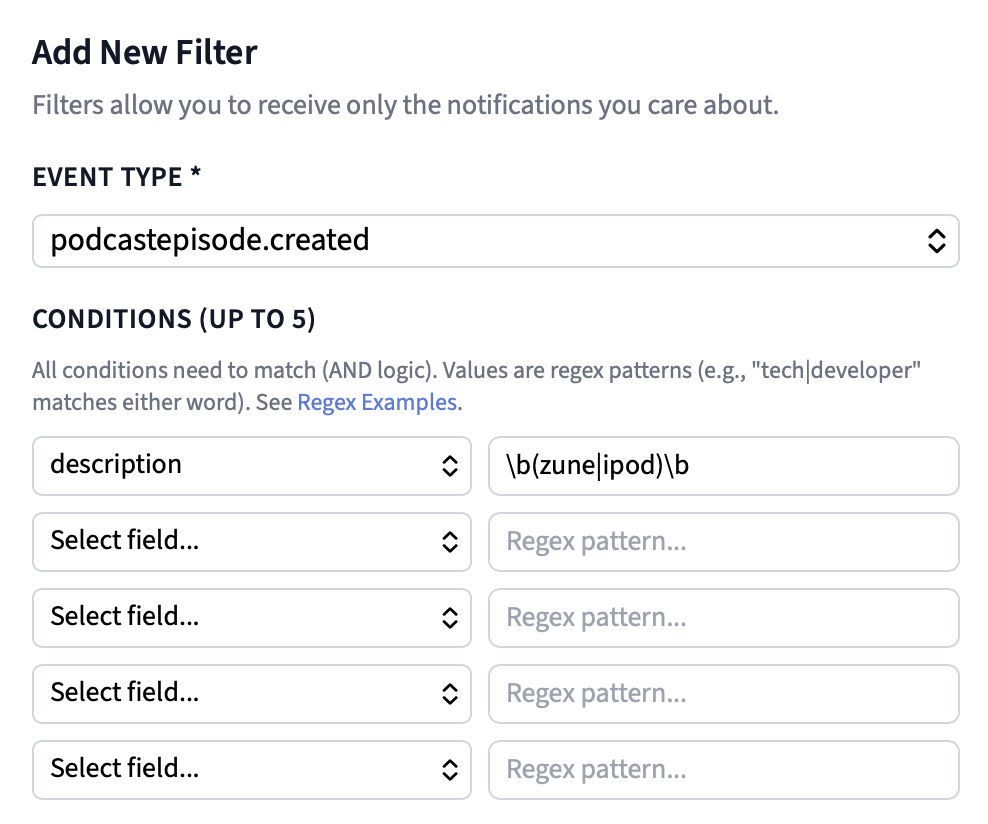
## Regex Examples
| Pattern | Matches |
| --- | --- |
| `tech|developer` | Contains "tech" or “developer” |
| `developer api|dev tools` | Matching words can contain spaces |
| `\btech\b` | Matching whole word "tech" (won't match "techno" or "biotech") |
| `the.+show` | Use `.+` as a wildcard to match unknown text. This matches "The Daily Show" or "The Late Night Show" |
| `\b(chris )?lattner\b` | Matches for Chris Lattner or just Lattner |
| `\b(chris )?lattner\b` AND `\b(apple|google|tesla|modular|mojo)\b` | You can add multiple conditions. This allows you match for more complex queries like: Chris Lattner AND (Apple or Google or Tesla or Modular or Mojo - places where he has worked). See Example 2 below for more details. |
| `TOP_(200|1000|2000|3000|4000|5000)` | Check if a podcast is a TOP_200 to TOP_5000 podcast |
| `\bapple\b(?! podcasts)` | Match "apple" and exclude the next word "podcasts” |
**Notes:**
- Regex uses case insensitive matching (`iPod` and `ipod` are equivalent)
- Regex is matched anywhere in the value: `apple` also matches "pineapple". Use `\bapple\b`to match the whole word.
- We block regex patterns containing `*` , but not `+` . Use `.+` instead as a wildcard to match unknown text.
- If the property you are matching against returns an array, we will check each item in the array and check if it matches your regex expression. For example, In the zune example above, `podcastSeries.genres` returns the array `["PODCASTSERIES_TECHNOLOGY", "PODCASTSERIES_NEWS", "PODCASTSERIES_NEWS_TECH"]`. If you add an regex expression that matches for `PODCASTSERIES_TECHNOLOGY` we will successfully find this match.
- A clause never matches when the value is null, empty, `false` or `0`.
- There is a 500 character limit for regex expressions.
## Webhook Event Example
On Taddy’s server, whenever a new episode is released, we check whether it matches any of your filters. If it does, we send the event to your webhook endpoint. Here's an example webhook event for a newly released episode:
```graphql
// EXAMPLE WEBHOOK event for a PodcastEpisode
{
"uuid": "5c04591a-ac2e-49a2-acf8-417776ab7bf0",
"taddyType": "podcastepisode",
"action": "created",
"timestamp": 1762077600,
"data": {
"uuid": "5c04591a-ac2e-49a2-acf8-417776ab7bf0",
"hash": "e9741462006248fc1ce94ac501240873e75a644414f41e638ca606664e706218",
"name": "Version History: Zune",
"description": "
In 2006, Microsoft came for the iPod's throne with an innovative MP3 player called the Zune. It had a bunch of features the iPod didn't: WiFi, music sharing, a bigger screen, a beautiful UI, even an FM radio. And to hear Microsoft describe it, it was even kind of a social network. Nilay Patel and Victoria Song join David Pierce to break down why, despite all that, the Zune never really took off. And why it came in brown.
",
"imageUrl": null,
"datePublished": 1762077600,
"guid": "b1b3b8a4-97ea-11f0-8c9e-a31de8fbd080",
"subtitle": null,
"audioUrl": "https://www.podtrac.com/pts/redirect.mp3/pdst.fm/e/pscrb.fm/rss/p/traffic.megaphone.fm/VMP7431183096.mp3?updated=1762092793",
"videoUrl": null,
"fileLength": null,
"fileType": "audio/mpeg",
"duration": 4638,
"episodeType": "FULL",
"seasonNumber": null,
"episodeNumber": null,
"websiteUrl": null,
"isExplicitContent": false,
"isRemoved": null,
"podcastSeries": {
"uuid": "4bb5a32e-3c92-4669-b8f1-6360ada2cc94",
"name": "The Vergecast",
"rssUrl": "https://feeds.megaphone.fm/vergecast",
"itunesId": 430333725,
"language": "ENGLISH",
"genres": ["PODCASTSERIES_TECHNOLOGY", "PODCASTSERIES_NEWS", "PODCASTSERIES_NEWS_TECH"],
"popularityRank": "TOP_2000"
}
},
matchingFilters: ['12345678-abcdefgh-12345678-abcdefgh']
}
```
**Notes:**
- You can set up multiple filters, when there is a new podcast or episode data, we check to see if it successfully matches regex expressions from ANY of your filters.
- Inside one filter every clause must match (treat each clause like an AND). Across filters, any filter can match (treat each filter like an OR). To match a term that could be in its name or its description, you should create two filters, one for `name` and one for `description`.
- You can use regex `|` (or) to combine multiple terms you want to match in one filter. e.g.) matching `description` to `\b(radio|ipod|sony walkman|zune)\b`
- Filters only narrow the event types they are set on. If an event type has no filter at all, you receive every event of that type; a filter on `podcastepisode.created` does not affect `podcastepisode.updated`.
- If more than one filter matches for a webhook event, you still receive only one webhook event to your endpoint. The `matchingFilters` array will contain all the filter uuids that successfully matched for this event.
- By default, Business accounts come with 100 webhook filters, contact [`danny@taddy.org`](mailto:danny@taddy.org) if you’d like to add more to your account.
- You can add, update or remove filters via our Dashboard, but you can also do it via GraphQL mutations. See **Programmatically Adding and Removing Filters** section below.
## Fields you can filter on
A filter is an event type (`podcastepisode.created`, `podcastseries.updated`, ...) plus up to five clauses. Each clause is a field from the webhook event. Which fields are valid depends on the type being sent:.
| Event type starts with | Fields |
| --- | --- |
| `podcastepisode.` | `uuid`, `hash`, `name`, `description`, `imageUrl`, `datePublished`, `guid`, `subtitle`, `audioUrl`, `videoUrl`, `fileLength`, `fileType`, `duration`, `episodeType`, `seasonNumber`, `episodeNumber`, `websiteUrl`, `isExplicitContent`, `isRemoved`, `podcastSeries.uuid`, `podcastSeries.name`, `podcastSeries.rssUrl`, `podcastSeries.itunesId`, `podcastSeries.language`, `podcastSeries.genres`, `podcastSeries.popularityRank` |
| `podcastseries.` | `uuid`, `hash`, `name`, `description`, `imageUrl`, `datePublished`, `language`, `seriesType`, `contentType`, `isExplicitContent`, `copyright`, `websiteUrl`, `rssUrl`, `rssOwnerName`, `rssOwnerPublicEmail`, `authorName`, `isCompleted`, `isBlocked`, `itunesId`, `genres`, `childrenHash`, `popularityRank`, `itunesInfo.uuid`, `itunesInfo.publisherId`, `itunesInfo.publisherName`, `itunesInfo.baseArtworkUrl` |
| `itunesinfo.` | `uuid`, `hash`, `subtitle`, `summary`, `baseArtworkUrl`, `publisherId`, `publisherName`, `country`, `podcastSeries.uuid`, `podcastSeries.name`, `podcastSeries.rssUrl`, `podcastSeries.itunesId`, `podcastSeries.language`, `podcastSeries.genres`, `podcastSeries.popularityRank` |
## AllowList & BlockList
To every filter, you can also add a list of podcast uuids that the content has to be from (AllowList) or a list of podcast uuids that are excluded (BlockList).

**Notes:**
- A useful use case for AllowLists is if you only need to keep track of a very small subset of the 4 million podcasts in Taddy API’s index.
- A useful use of BlockLists is if you have setup a filter and consistently see matches from a specific podcast that you want to exclude from receiving any future webhooks events.
- We match the exact value you provide in these lists against a podcast’s uuid, rssUrl or itunesId exact value and check if its a match.
## Examples
**Example 1:** Notify me when an episode's description contains keywords I care about and the podcast is in a genre I care about.
- `description` MATCHES `\b(radio|ipod|sony walkman|zune)\b`
- `podcastSeries.genres` MATCHES `PODCASTSERIES_TECHNOLOGY`

**Example 2:** Notify me when a new interview of Chris Lattner is released. I want to make sure it is the Chris Lattner in tech, so I'm also going to check that the episode's description mentions a company he has worked at (Apple, Google, Tesla, Modular, Mojo). His name can be in the title or in the description, and every clause in one filter must match, so this is two filters:
Filter 1:
- `name` MATCHES `\b(chris )?lattner\b`
- `description` MATCHES `\b(apple|google|tesla|modular|mojo)\b`
Filter 2:
- `description` MATCHES `\b(chris )?lattner\b`
- `description` MATCHES `\b(apple|google|tesla|modular|mojo)\b`
**Example 3:** Notify me when a new episode is released from the most popular podcasts.
- `podcastSeries.popularityRank` MATCHES `TOP_(200|1000|2000|3000|4000|5000)`
**Example 4:** Notify me when a new episode is released in the any of the Business sub-genres (`PODCASTSERIES_BUSINESS`, `PODCASTSERIES_BUSINESS_CAREERS`, `PODCASTSERIES_BUSINESS_ENTREPRENEURSHIP`, `PODCASTSERIES_BUSINESS_INVESTING`, `PODCASTSERIES_BUSINESS_MANAGEMENT`, `PODCASTSERIES_BUSINESS_MARKETING`, `PODCASTSERIES_BUSINESS_NON_PROFIT`)
- `podcastSeries.genres` MATCHES `PODCASTSERIES_BUSINESS`
**Example 5:** Notify me when a new episode is released where the episode’s duration is greater than 1 hour (3600 seconds):.
- `duration` MATCHES `^(360[1-9]|36[1-9][0-9]|3[7-9][0-9]{2}|[4-9][0-9]{3}|[1-9][0-9]{4,})$`
```
**Regex Breakdown:**
- 360[1-9] → 3601-3609
- 36[1-9][0-9] → 3610-3699
- 3[7-9][0-9]{2} → 3700-3999
- [4-9][0-9]{3} → 4000-9999
- [1-9][0-9]{4,} → 10000+
```
## Mock Webhook Event
Want to test your regex expressions to make sure your webhook filters work as expected? Use the `mockWebhookEvent`mutation.
If you know a specific podcast or episode that should match your filters, you can use this mutation to simulate the webhook event. Taddy will process it against all your filters and, if there's a match, send it to your webhook endpoint, just like a real event. This lets you verify your filters are working correctly without waiting for new content to be released.
```graphql
mutation MockWebhookEvent($webhookId: ID!, $taddyType: String!, $action: WebhookEventActionType!, $contentUuid: String!) {
mockWebhookEvent(webhookId: $webhookId, contentUuid: $contentUuid, taddyType: $taddyType, action: $action)
}
# input for mockWebhookEvent
{
"webhookId": "your-webhook-id",
"taddyType": "podcastseries", # podcastseries, podcastepisode or itunesinfo
"action": "created", # created, updated, or deleted
"contentUuid": "content-uuid"
}
```
Try this out at: [https://api.taddy.org](https://api.taddy.org) (our GraphQL Playground)
## Programmatically Adding and Removing Filters
You can add, update or delete webhook filters via GraphQL instead of our Dashboard. A use case for using this would be if you would like to create filters on behalf of your users.
```graphql
mutation AddWebhookFilter($webhookId: ID!, $filter: WebhookFilterInput!) {
addWebhookFilter(webhookId: $webhookId, filter: $filter) {
id
}
}
mutation UpdateWebhookFilter($webhookId: ID!, $filterUuid: ID!, $filter: WebhookFilterInput!) {
updateWebhookFilter(webhookId: $webhookId, filterUuid: $filterUuid, filter: $filter) {
id
}
}
mutation DeleteWebhookFilter($webhookId: ID!, $filterUuid: ID!) {
deleteWebhookFilter(webhookId: $webhookId, filterUuid: $filterUuid) {
id
}
}
```
You can also add or remove items to the allowlist or blocklist programmatically.
```graphql
mutation AddUuidToWebhookFilterAllowlist($webhookId: ID!, $filterUuid: ID!, $contentUuid: String!) {
addUuidToWebhookFilterAllowlist(webhookId: $webhookId, filterUuid: $filterUuid, contentUuid: $contentUuid) {
uuid
}
}
mutation DeleteUuidFromWebhookFilterAllowlist($webhookId: ID!, $filterUuid: ID!, $contentUuid: String!) {
deleteUuidFromWebhookFilterAllowlist(webhookId: $webhookId, filterUuid: $filterUuid, contentUuid: $contentUuid) {
uuid
}
}
mutation AddUuidToWebhookFilterBlocklist($webhookId: ID!, $filterUuid: ID!, $contentUuid: String!) {
addUuidToWebhookFilterBlocklist(webhookId: $webhookId, filterUuid: $filterUuid, contentUuid: $contentUuid) {
uuid
}
}
mutation DeleteUuidFromWebhookFilterBlocklist($webhookId: ID!, $filterUuid: ID!, $contentUuid: String!) {
deleteUuidFromWebhookFilterBlocklist(webhookId: $webhookId, filterUuid: $filterUuid, contentUuid: $contentUuid) {
uuid
}
}
```
Contact [`danny@taddy.org`](mailto:danny@taddy.org) if you’d like to add more webhook filters to your account (every Business Account comes with 100 webhook filters).
Back to:
[Webhooks](#webhooks)
GraphQL Types mentioned:
[Webhook Types](#webhookfilterinput-webhookfilter-webhook-types)
[PodcastSeries](#podcastseries)
[PodcastEpisode](#podcastepisode)
[Genre](#genre)
[PopularityRank](#popularityrank)
[iTunesInfo](#itunesinfo)
[Language](#language)
[PodcastSeriesType](#podcastseriestype)
[PodcastEpisodeType](#podcastepisodetype)
[PodcastContentType](#podcastcontenttype)
[FeedRefreshDetails](#feedrefreshdetails)
---
# SortOrder
SortOrder gives you the ability to return different items based on what option you pass in.
```graphql
enum SortOrder {
LATEST
OLDEST
SEARCH
}
```
`LATEST` - Return latest (newest) first
`OLDEST` - Return oldest first
`SEARCH` - Return only episodes that match filtered `searchTerm` (another property that should be passed in whenever `SEARCH` is chosen as the SortOrder).
---
# Taddy API Skill, MCP Server, and Docs
We have a couple of AI tools to help you get the most out of Taddy Podcast API
1. **Taddy API Skill** - We recommend using our [open-source skill](https://github.com/taddyorg/taddy-api-skills) when you add Taddy Podcast API to your application. It gives your AI coding tool (Claude Code, Codex, Cursor etc.) our full API docs in Markdown, our GraphQL schema, and best practices for things like pagination and error handling.
2. **MCP Server for Taddy API** – Use Taddy API’s MCP server if you want to get podcast data (including transcripts) inside ChatGPT, Claude, or any MCP-compatible app. ex) You can ask to "Find recent episodes that mention [my company] and summarize the positive and negative feedback"*.*
3. **Taddy API Docs** - If you just want to provide to your AI coding tool our API docs & GraphQL schema. It's the building blocks we used to make the Taddy API Skill.
## 1. Adding Taddy API’s Skill to your project
```bash
# Claude Code
/plugin marketplace add taddyorg/taddy-api-skills
/plugin install taddy-podcast-api@taddy-api
# Plugins have the ability to auto-update
# Codex
# 1. Add github repo as an available plugin
codex plugin marketplace add taddyorg/taddy-api-skills
# 2. Then open Codex, run /plugin and pick Taddy Podcast API. Plugins have the ability to auto-update
# Other AI Tools
Ask your AI agent to: Download the Taddy API skill from https://github.com/taddyorg/taddy-api-skills into your project's skills folder
# Not a plugin, so you may have to update manually in the future
```
## 2. Adding Taddy API’s MCP server to your project
Taddy API’s MCP Server is available at: [https://taddy.org/mcp/podcast-api](https://taddy.org/mcp/podcast-api)
You will need your Taddy API User ID and API Key, you can get them at: [https://taddy.org/dashboard](https://taddy.org/dashboard)
### Adding MCP Server to Claude Desktop or [claude.ai](http://Claude.AI)
Follow these steps:
1. Open Claude and click on Settings → Customize → Add → Add Custom Connector
2. Add link to the MCP Server: [https://taddy.org/mcp/podcast-api](https://taddy.org/mcp/podcast-api)
3. Add Headers `x-account-id` and `x-api-key`. You will find these value on the [Taddy Dashboard](https://taddy.org/dashboard).
**Note:** The Taddy API normally uses `x-user-id`, but Claude only supports a limited set of custom headers by default, and `x-user-id` isn’t one of them. Use `x-account-id` instead. We’ll map it to `x-user-id` automatically.

### Adding MCP Server to ChatGPT Desktop
Follow these steps:
1. Open ChatGPT, and click on Settings → Plugins → Add → Add MCP Server
2. Add link to the MCP Server: [https://taddy.org/mcp/podcast-api](https://taddy.org/mcp/podcast-api)
3. Add Headers `x-user-id` and `x-api-key`. You will find these value on the [Taddy Dashboard](https://taddy.org/dashboard).

### Adding MCP Server to Claude Code or Codex
For Claude Code, add or append to `.mcp.json`
```toml
{
"mcpServers": {
"taddy-podcast-api": {
"type": "http",
"url": "https://taddy.org/mcp/podcast-api",
"headers": {
"X-USER-ID": "${TADDY_USER_ID}",
"X-API-KEY": "${TADDY_API_KEY}"
}
}
}
}
```
For Codex, add or append to `~/.codex/config.toml`
```toml
[mcp_servers.taddy-podcast-api]
url = "https://taddy.org/mcp/podcast-api"
env_http_headers = { "X-USER-ID" = "TADDY_USER_ID", "X-API-KEY" = "TADDY_API_KEY" }
```
And set these credentials in the environment:
```bash
export TADDY_USER_ID=""
export TADDY_API_KEY=""
```
## 3. Taddy API Docs
Here are two resources that you can provide your AI coding tool to give it useful context about our API, we used this as input for the [Taddy API Skill](#taddy-api-skill-mcp-server-and-docs):
1. [**GraphQL Schema**](https://ax0.taddy.org/docs/taddy-podcast-api-schema.graphql) - The complete Podcast API GraphQL schema with all available types, queries, and mutations available.
2. [**Taddy API Documentation**](https://ax0.taddy.org/docs/taddy-podcast-api-docs.md) - The full documentation for Taddy Podcast API in one big markdown file.
More Links:
[Sign Up →](https://taddy.org/signup/developers)
[Taddy Dashboard →](https://taddy.org/dashboard)
[Pricing](#pricing)
[Terms of Service](https://taddy.org/terms-of-service)
[Developer Policy](https://taddy.org/terms-of-service/developer-policy)
---
# TaddyType
The different types of media available on Taddy
```graphql
enum TaddyType {
PODCASTSERIES
PODCASTEPISODE
COMICSERIES
COMICISSUE
CREATOR
}
```
`PODCASTSERIES` - A podcast
`PODCASTEPISODE` - An episode of a podcast
`COMICSERIES` - A comic
`COMICISSUE` - An issue (episode) of a comic
`CREATOR` - A creator (that made the podcast or comic).
---
# Top Charts on Apple Podcasts
Use getTopChartsByCountry or getTopChartsByGenres to get the top podcasts or episodes from Apple Podcasts.
**Notes:**
- Top Charts are updated daily (~ 9 AM PST)
- For Podcasts, you can get Top Charts by country or genre
- For Episodes, you can only get Top Charts by country.
## Examples:
1. Get today’s Top Podcasts in the US
```graphql
{
getTopChartsByCountry(taddyType:PODCASTSERIES, country:UNITED_STATES_OF_AMERICA){
topChartsId
podcastSeries{
uuid
name
}
podcastEpisodes{
uuid
name
podcastSeries{
uuid
name
}
}
}
}
```
2. Get today’s Top Episodes in the US
```graphql
{
getTopChartsByCountry(taddyType:PODCASTEPISODE, country:UNITED_STATES_OF_AMERICA){
topChartsId
podcastSeries{
uuid
name
}
podcastEpisodes{
uuid
name
podcastSeries{
uuid
name
}
}
}
}
```
3. Get today’s Top Podcasts in the `PODCASTSERIES_TRUE_CRIME` Genre
```graphql
{
getTopChartsByGenres(taddyType:PODCASTSERIES, genres:PODCASTSERIES_TRUE_CRIME){
topChartsId
podcastSeries{
uuid
name
}
podcastEpisodes{
uuid
name
podcastSeries{
uuid
name
}
}
}
}
```
4. (BONUS) You can get Top Episodes by Genre and Country. Use `getTopChartsByGenres` and pass in the `filterByCountry`. Behind the scenes, this is the same data from Apple’s Top 200 Episodes chart for a country, we filter by genre to get a Top Episodes by Genre and Country chart. Since Apple provides only 200 top episodes per day per country, there is a chance that some genres will return no episodes.
```graphql
{
getTopChartsByGenres(taddyType:PODCASTEPISODE, genres:PODCASTSERIES_TRUE_CRIME, filterByCountry:UNITED_STATES_OF_AMERICA){
topChartsId
podcastSeries{
uuid
name
}
podcastEpisodes{
uuid
name
podcastSeries{
uuid
name
}
}
}
}
```
## Query Input:
1. For getTopChartsByCountry, you can get the top charts for a specific platform (for podcasts or episodes):
```graphql
" The type of content you want to get top charts information on. "
taddyType: TaddyType!
" Which country do you want the Top Charts for."
country: Country!
" (Optional) The platform to check for top charts content. Default is APPLE_PODCASTS "
source: TopChartsSource
" (Optional) Allows for pagination. Default is 1 (ie: page 1 of the results). Max value is 8. "
page: Int
" (Optional) The number of results per page. Default is 10. Max value is 25 (ie: that max results you can return in one query in 25) "
limitPerPage: Int
```
2. For getTopChartsByGenres, you can get the top charts for a specific platform (for podcasts or episodes):
```graphql
" The type of content you want to get top charts information on. "
taddyType: TaddyType!
" Which genres do you want the Top Charts for."
genres: [Genre!]
" (Optional) The platform to check for top charts content. Default is APPLE_PODCASTS "
source: TopChartsSource
" (Optional) We filter the results by country (needed for PODCASTEPISODE taddyType)"
filterByCountry: Country
" (Optional) Allows for pagination. Default is 1 (ie: page 1 of the results). Max value is 20. "
page: Int
" (Optional) The number of results per page. Default is 10. Max value is 25 (ie: that max results you can return in one query in 25) "
limitPerPage: Int
```
## Query Response:
The response you get back includes an array of [PodcastSeries](#podcastseries) and [PodcastEpisodes](#podcastepisode) that match your top charts query.
```graphql
" Identifier for the top charts query being sent (Used for caching) "
topChartsId: ID!
" A list of PodcastSeries items "
podcastSeries: [PodcastSeries]
" A list of PodcastEpisode items "
podcastEpisodes: [PodcastEpisode]
```
### Referenced types in this document:
[TaddyType](#taddytype)
[Country](#country)
[Genre](#genre)
[TopChartsSource](#topchartssource)
[TopChartsType](#topchartstype)
More Links:
[Sign Up →](https://taddy.org/signup/developers)
[Taddy Dashboard →](https://taddy.org/dashboard)
[Pricing](#pricing)
[Terms of Service](https://taddy.org/terms-of-service)
[Developer Policy](https://taddy.org/terms-of-service/developer-policy)
---
# TopChartsSource
A list of platforms you can get Top Charts data from
```graphql
enum TopChartsSource {
APPLE_PODCASTS // we only support Apple Podcasts at the moment
}
```
---
# TopChartsType
A list of possible categories for podcasts or episodes to be ranked in
```graphql
enum TopChartsType {
GENRE
COUNTRY
}
```
---
# TranscriptItem
Get the transcript for an episode. Includes text, timecodes and speaker info.
```graphql
type TranscriptItem {
" The unique identifier for the transcript item "
id: ID
" The text of the transcript item "
text: String
" (Optional) The speaker of the transcript item "
speaker: String
" The start timecode of the transcript item in milliseconds "
startTimecode: Int
" The end timecode of the transcript item in milliseconds "
endTimecode: Int
}
```
### TranscriptItemStyle
Depending on which style you pick, you will get back a different TranscriptItems.
```graphql
enum TranscriptItemStyle {
UTTERANCE
PARAGRAPH
}
```
`UTTERANCE` is a phrase, thought, or sentence spoken by a user and is the default returned via Open AI’s Whisper model.
`PARAGRAPH` (Default): Combines utterances into a complete sentence and then different paragraphs based on if there is greater than a 500 millisecond break in speech.
Please see [transcripts](#get-episode-transcripts) for additional context.
---
# TranscriptLink
Link details where you can download an episode’s transcript. Along with the url, it also contains additional information like file type and language, which may be useful to you.
```graphql
type TranscriptLink {
" The url to the transcript "
url: String
" Mime type of file"
type: String
" If the transcript is exclusive to Taddy API Business users and you need an API key to access it "
isTaddyExclusive: Boolean
" (Optional) The language of the transcript "
language: String
" (Optional) If the transcript has timecodes "
hasTimecodes: Boolean
}
```
Please see [transcripts](#get-episode-transcripts) for additional context.
---
# WebhookFilterInput, WebhookFilter & Webhook Types
You can [add, update or remove a webhook filter](#setting-up-a-webhook-filter) programatically. When you do so you pass in the webhookId and a WebhookFilterInput, and the filters come back as WebhookFilter.
```graphql
" Input for creating/updating a filter "
input WebhookFilterInput {
" The event type this filter applies to, in the form taddyType.action (e.g. podcastepisode.created). Must be an event type the webhook is subscribed to "
eventType: String!
" (Optional) A label for this filter. Not used for matching, so you can store your own key in it (e.g. watchlist:AAPL:name) "
description: String
" (Optional) Clause 1: a field from the event payload (e.g. name, description, podcastSeries.genres). Valid fields depend on the taddyType in eventType. Must be set together with value1 "
field1: String
" (Optional) Clause 1: the regex that field1 must match. Case-insensitive, matched anywhere in the value, max 500 characters; * is not allowed (use .+ or a bounded repeat). All clauses in a filter must match (AND); any filter may match (OR) "
value1: String
" (Optional) Clause 2, see field1 "
field2: String
" (Optional) Clause 2, see value1 "
value2: String
" (Optional) Clause 3, see field1 "
field3: String
" (Optional) Clause 3, see value1 "
value3: String
" (Optional) Clause 4, see field1 "
field4: String
" (Optional) Clause 4, see value1 "
value4: String
" (Optional) Clause 5, see field1 "
field5: String
" (Optional) Clause 5, see value1 "
value5: String
" (Optional) AllowList: only content from these podcasts matches. Each entry is a podcast uuid, rssUrl or itunesId "
includedUuids: [String]
" (Optional) BlockList: content from these podcasts never matches. Each entry is a podcast uuid, rssUrl or itunesId "
excludedUuids: [String]
}
" A filter for a webhook (one row = one event type + clauses) "
type WebhookFilter {
" The unique identifier for the filter "
uuid: ID!
" The label you gave the filter "
description: String
" The webhook this filter belongs to "
webhookId: ID
" The event type this filter applies to (e.g. podcastepisode.created) "
eventType: String!
" Clause 1 as one string: 'field1' MATCHES 'value1', with the regex exactly as stored. Null when the clause is not set. To compare with your own field and regex, split on the first ' MATCHES ' and remove the outer single quotes "
clause1: String
" Clause 2, same format as clause1 "
clause2: String
" Clause 3, same format as clause1 "
clause3: String
" Clause 4, same format as clause1 "
clause4: String
" Clause 5, same format as clause1 "
clause5: String
" True if the filter has an AllowList "
hasIncludedUuids: Boolean
" True if the filter has a BlockList "
hasExcludedUuids: Boolean
" AllowList entries "
includedUuids: [String]
" BlockList entries "
excludedUuids: [String]
}
" Webhook Details "
type Webhook {
" The unique identifier for the webhook "
id: ID!
" Date created (Epoch time in seconds) "
createdAt: Int
" User that created the webhook "
user: User
" URL for the webhook "
endpointUrl: String
" Secret for the webhook "
webhookSecret: String
"If the webhook is verified or not"
isVerified: Boolean
"If the webhook is active or not"
isActive: Boolean
"Events that get triggered for the webhook"
events: [String]
" Filters for this webhook "
filters: [WebhookFilter]
}
```
---
# Webhooks
Taddy API is constantly being updated with the latest podcasts and episodes. If you use our webhooks feature, instead of you having to manually check Taddy API for new podcasts or episodes, we send you the details on new podcasts and episodes to an endpoint on your server.
Moreover, you have the ability to [add webhook filters](#setting-up-a-webhook-filter), so instead of getting a webhook event for every new podcast or episode, you can use filters to add a regex expression and only get notified for the specific content you care about.
## Use-cases for Webhooks
- Do you want to monitor your brand? Set up a filter to get notified whenever your brand or website are mentioned.
- Are you doing sales intelligence or lead nurturing? Set up a filter to get notified when a potential lead appears on an episode, get the transcript of the episode and use this data for insights or lead scoring.
- Are you doing competitor or industry research? Set up a filter to get notified when an industry keyword or competitor’s key executive is mentioned, get the transcript of the episode and use this data for insights.
- Are you building a podcast player and want to send push notifications for new episodes? Set up a webhook without any filters to get notified whenever a new episode is released, then on your server, match against your users' subscriptions and send them a push notification.
## Setting Up a Webhook
- Open up the [**Taddy Dashboard**](https://taddy.org/dashboard), you will see a “Setup a New Webhook” button.

Then, make sure you:
1. Enter in the endpoint where you want to receive the notifications (usually on your own server, but you can also point this to a Zapier, n8n, Make or Gumloop workflow)
2. Select which webhook events you would like to receive.
3. Optionally, you can add one or more [webhook filters](#setting-up-a-webhook-filter).
**Note:**
- You must be on the Business plan to add a webhook to your account.
- Receiving a webhook event does not count against your monthly API limits 🥳.
- You can use [webhook.site](https://webhook.site/) to easily check what a webhook event sent from Taddy API looks like. Just paste in the unique URL from the website as your webhook endpoint to start receiving webhook events.
- Alternatively, here is some [example code](https://gist.github.com/dmathewwws/ae9045ef66b63c8ab6aedc75759afc71) to set up your webhook endpoint.
- The endpoint url you enter into the Taddy API Dashboard needs to be one publicly accessible over the internet. (For example, 127.0.0.1 and localhost URLs will not work, since Taddy servers will not be able to contact your local computer). If you’d like to test receiving these notifications locally on your computer, [Cloudflare Quick Tunnel](https://try.cloudflare.com) or [Ngrok](https://ngrok.com) provide useful & free options to do so. (They provides you a public url that is mapped to your localhost).
- Your endpoint url needs to be a `POST` endpoint
- On the Taddy API Dashboard, after you set up a webhook we will display your webhook’s secret. This is an optional but recommended security feature. We include this secret in the `X-TADDY-WEBHOOK-SECRET` header with every webhook event sent to your endpoint. Keep this secret confidential, your endpoint URL may be publicly accessible, but by verifying that the `X-TADDY-WEBHOOK-SECRET` header matches your secret you can be confident that any data you receive on your endpoint is from us and can be trusted.
- You can also create the endpoint programatically from code: `addWebhookUrlForUser(endpointUrl: "https://...", webhookEvents: ["podcastepisode.created"])` returns the `Webhook` with its `id` and `webhookSecret`. `updateWebhookForUser` is used to update the webhook.
- By default, every business account has access to one webhook endpoint. Reach out to `danny@taddy.org` if would like to increase your limits.
## Webhook Events
You can receive webhook events for new or updated `PodcastSeries`, `PodcastEpisodes`, or `iTunesInfo`.
Each webhook event is made up of: `uuid`, `taddyType`, `action`, `timestamp`, `data` (and `matchingFilters` if you have setup a filter).
### PodcastEpisode
| **Event** | **Description** |
| --- | --- |
| `podcastepisode.created` | Get a notification when a new podcast episode has been released |
| `podcastepisode.updated` | Get a notification when a podcast episode’s details have been updated (e.g. title, description, audioUrl, etc.). |
| `podcastepisode.deleted` | Get a notification when a podcast episode has been removed from Taddy API. |
```graphql
// EXAMPLE WEBHOOK event for a PodcastEpisode
{
uuid: 'a2b41ecd-565c-4f29-8cf9-ac737bcc8d99',
taddyType: 'podcastepisode',
action: 'updated',
timestamp: 1673984261,
data: {
uuid: 'a2b41ecd-565c-4f29-8cf9-ac737bcc8d99',
hash: '8130da98420b6ea1bcafd9a7e411625bf0437e93cd2e44b0a2291430e7cd940c',
name: 'Consider the Burying Beetle. (Or Else.)',
description: '
The current level of biodiversity loss is extraordinary in human history: The global rate of species extinction is at least tens to hundreds of times higher than the average over the past 10 million years.
At the end of 2022, countries around the world came together in Montreal for an agreement akin to the Paris climate accord to tackle the biodiversity crisis. Here’s more on the effort and how it seeks to confront the problem.
Guest: Catrin Einhorn, who reports on biodiversity and climate for The New York Times.